

What if a connector looks like it fits but isn’t approved for the truss configuration? Portable lighting layouts can change as fixtures, spans, support points, and loads shift. Choosing hardware by appearance or part name alone leaves important compatibility questions unanswered. This stage lighting truss hardware guide starts with the complete configuration, not an isolated clamp or connector.
It’s reasonable to want a straightforward way to select and handle components, especially when a setup changes between productions. Safe planning, however, depends on checking how each component works with the rest of the system and confirming that the planned arrangement matches the manufacturer’s documentation.
Learn what common truss hardware does, what to verify before assembly and use, and how to apply manufacturer load information to a changing layout. A practical checklist can help organize checks during setup, operation, and dismantling, while showing when documentation or qualified rigging expertise is needed. The goal is a repeatable process for evaluating the full portable rigging configuration.
Key Takeaways
- Plan portable rigging as a complete system, using manufacturer instructions alongside the site-specific plan.
- Confirm that truss sections, connectors, base plates, and supports are designed to work together. Similar appearance does not prove compatibility.
- Use this stage lighting truss hardware guide to understand why component ratings alone do not validate a complete layout.
- Follow a consistent pre-assembly checklist to review documentation and verify the planned configuration before use.
- Build a repeatable cycle for inspection, documentation, and storage. Distinguish routine visual checks from assessments that require qualified personnel.
Stage Lighting Truss Hardware Guide: Start With the Complete Rigging Plan
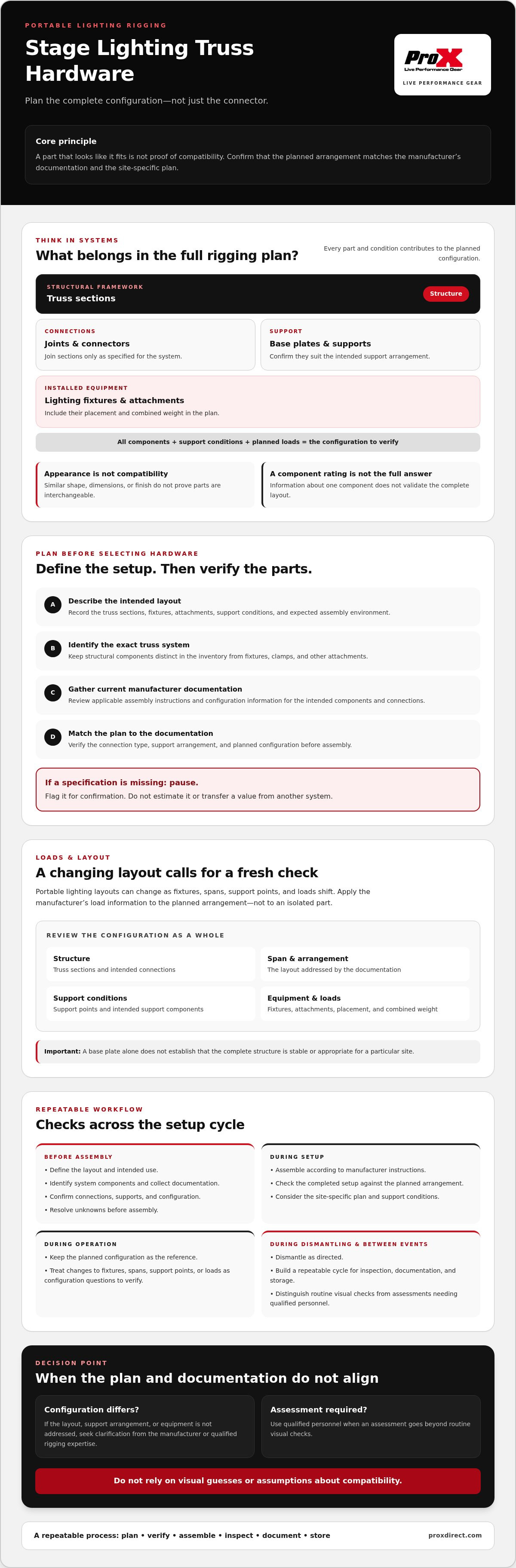
Plan a portable lighting rig as one system, not as a collection of independently selected parts. Its structural arrangement, connections, supports, fixtures, attachments, and loads all affect the configuration. The What is a Truss overview introduces truss structures, but it cannot establish whether a specific system or layout is suitable for a production.
Truss hardware includes the components used to connect and support truss sections. The complete rigging system also includes the structure, support conditions, attached equipment, and planned loads. This distinction matters: choosing a connector by appearance or considering one component’s information in isolation does not verify the complete arrangement.
What belongs in a portable stage lighting truss system?
Truss sections form the structural framework. Connection hardware joins compatible sections, while base plates provide a point of support where the system is designed to use them. A particular configuration may also require other support components. Lighting fixtures and their attachments belong in the plan because they contribute to the arrangement and its total load. Their placement matters as well as their combined weight.
Component roles and connection methods vary by system. ProX offers ProX truss systems to help you review available truss options. For any system, check the current manufacturer documentation for the intended components and connections. Do not assume similar-looking parts will fit or function together.
What information should be collected before choosing hardware?
Record the intended layout, truss sections, lighting fixtures, attachments, support conditions, and expected assembly environment. Identify the exact truss system and gather its current documentation, including applicable assembly instructions and configuration information. If a specification is missing, flag it for confirmation. Do not estimate it or transfer a value from another system.
A practical planning sequence is to define the use, identify the components, verify the documentation, assemble according to the manufacturer’s instructions, inspect the completed setup, and dismantle it as directed. This stage lighting truss hardware guide can help organize those decisions, but it cannot replace project-specific engineering, a site-specific plan, or manufacturer instructions.
Resolve unknowns before assembly. If the intended layout, support arrangement, or equipment differs from what the documentation addresses, seek clarification from the manufacturer or qualified rigging expertise. A clear plan gives hardware selection and verification a defined basis, without relying on visual guesses or assumptions about compatibility.
Identify Stage Lighting Truss Hardware and Confirm Component Compatibility
Once the layout is defined, make the hardware inventory specific to the truss system. The stage lighting truss hardware guide approach is to verify each connection and support against that system’s documentation, rather than treating a collection of similar-looking parts as a universal kit.
How do truss sections and connection hardware fit together?
Truss sections form the structural runs; joints and connectors join sections at the locations and in the manner specified by the manufacturer. Use the system’s own terms for its connection hardware, then check the documented connection type and assembly instructions for each planned joint. Similar shapes, dimensions, or finishes do not establish that two parts are interchangeable. If the documentation does not confirm a proposed combination, pause and seek manufacturer clarification before assembly.
When do base plates and support components matter?
Base plates and other support elements are part of the intended support arrangement. Their selection depends on the design, surface, configuration, and manufacturer guidance. A base plate alone does not establish that the complete structure is stable or appropriate for a particular site. Confirm that the support arrangement is addressed by the system documentation and the project-specific plan. For handling and storage context, see this stage truss and base plate case guide.
Keep structural components separate in the inventory from lighting fixtures, clamps, and other attachments. The truss, connectors, base plates, and applicable supports make up the structural system. Fixtures and attachments are installed on it and contribute to the planned configuration and load. Record each category so that a layout change prompts a review of both the structural connections and the equipment carried by the system.
A practical inventory can include:
- Structure: truss sections, identified by system and type.
- Connections: the specified joints, connectors, and associated parts.
- Supports: base plates and other components required by the documented arrangement.
- Attachments: fixtures and mounting accessories included in the lighting plan.
Use the ProX truss systems category as a reference when reviewing truss options. Then verify dimensions, connection compatibility, and other system details in current manufacturer documentation. A category overview does not replace project-specific verification.
Check Truss Loads, Span, and Configuration Before Adding Lighting
A component rating alone does not confirm that a complete truss arrangement is suitable. A rated section or connector does not validate a different span, support position, connection pattern, or combination of parts. Truss load limits are configuration-specific and must be verified against the applicable manufacturer documentation.
Assess the planned configuration as a whole. Account for the lighting fixtures, mounting attachments, cables, and other items included in the setup. Then check how their placement relates to the truss span, supports, and connections. Moving a fixture or changing a support location can change the configuration being assessed, so do not rely on a value detached from its documented conditions.
Which load details need verification before use?
Find the manufacturer’s information for the exact system and verify the applicable span, loading, connection, and support details. Record which documents support the planned arrangement. If load information is unclear, incomplete, or conflicting, stop and refer the question to the manufacturer or a qualified rigging professional. Do not estimate missing values or substitute information from a different system.
Use a worksheet to compare planned configurations only after each entry has been checked against the relevant manufacturer documentation. The table is a recordkeeping aid, not a source of ratings:
| Configuration detail | Record from applicable documentation |
|---|---|
| Truss system and component combination | Exact system and approved component details |
| Span and support locations | Documented conditions for the planned arrangement |
| Fixtures, attachments, cables, and other items | Planned equipment and relevant load information |
| Configuration-specific limitations | Manufacturer’s stated conditions or unresolved questions |
Why can two similar truss layouts have different requirements?
Similar-looking layouts may differ in span, support locations, component combinations, or equipment placement. Those differences can affect which manufacturer data applies. A general diagram or third-party value may explain a concept, but it does not approve a specific setup. Treat every changed layout as a configuration to verify against its own documentation.
Separate support applications also require their own system information. For example, consult the LED video panel wall support category only when planning that separately specified application. This stage lighting truss hardware guide is a planning reference, not project-specific engineering. Unresolved load or configuration questions call for qualified rigging expertise.
Use a Pre-Assembly and Setup Checklist for Portable Stage Rigging
A repeatable checklist helps crews catch missing documentation, mismatched components, and visible damage before setup proceeds. It does not replace the site-specific plan, manufacturer instructions, or qualified review. Use this stage lighting truss hardware guide as a planning framework, not as approval of a particular rig.
What should be checked before assembly begins?
- 1. Confirm the plan. Check that the intended layout and support conditions match the current site-specific plan and system documentation.
- 2. Identify the components. Verify that the truss sections, connections, base plates, and support elements are the ones specified for the system. Do not assume similar-looking parts are compatible.
- 3. Review the instructions. Make sure the correct manufacturer documentation and assembly instructions are available to the crew.
- 4. Check visible condition. Examine structural parts and connections for visible damage, deformation, or missing components. Record any concerns for review.
- 5. Resolve uncertainty. If a part’s identity, compatibility, condition, or instruction is unclear, pause setup and seek manufacturer guidance or qualified review.
A visual check can identify visible concerns, but it cannot establish capacity or approve a configuration. Those determinations require applicable documentation and, where needed, assessment by qualified personnel.
How should setup and dismantling follow the system documentation?
Assemble and dismantle the system using the sequence, tools, connection method, and handling instructions specified by its manufacturer. Do not substitute a familiar procedure from another system. Keep people and equipment clear of work areas as required by the event plan, and coordinate the work so the crew follows one documented process.
During setup and dismantling, document defects or unexpected conditions. Keep questionable components out of use until they have been assessed appropriately, and do not treat a successful visual check as structural approval. If site conditions or the planned arrangement differ from the instructions, stop and resolve the discrepancy before proceeding.
For a concise crew handoff, record the documentation reviewed, flagged components, and unresolved questions alongside the setup plan. The ProX truss systems category can help you review available truss options; confirm the requirements for a specific system in its current manufacturer documentation.
Inspect, Maintain, and Store Stage Lighting Truss Hardware Between Events
Use a consistent cycle between productions: inspect the components, document their condition, store them according to manufacturer instructions, and reassess them before the next use. Routine visual checks can identify concerns, but they do not replace any inspection or assessment required by the manufacturer or a qualified person. Follow the applicable instructions for the specific system. Do not assume prior use confirms a component’s current condition or suitability.
What warning signs should prompt a closer assessment?
Look for visible damage, deformation, loose or missing parts, and changes that cannot be explained by normal handling. Record what you observe, identify the affected component, and keep it out of use if its condition or suitability is uncertain. Do not attempt to repair structural components unless the manufacturer provides an applicable approved procedure. Seek qualified assessment when the component’s condition, use history, or compatibility with the planned configuration is unclear.
Keep records useful and specific. Note the component identity, observed concern, date of the check, and any follow-up needed. This gives the next pre-use review a reference and helps crews distinguish a newly observed issue from one already documented. A visual inspection is a screening step, not confirmation of structural capacity or approval for use.
How should truss components be handled and stored?
Use manufacturer instructions for handling, separating, stacking, and storing each system’s components. Keep sections, connectors, base plates, and support parts identified and organized so their system and intended use can be checked before assembly. Store records with the relevant equipment information, and reassess components before the next event instead of relying only on previous inspection notes.
Cases can support organized handling and storage, but they are not rigging components. For additional transport and storage context, read the flight case engineering guide. Follow the handling and storage instructions provided for the specific truss system and case.
This stage lighting truss hardware guide closes with a simple principle: record concerns, follow system instructions, and resolve uncertainty before reuse. Once you have established a verification process, explore ProX truss systems to review available options. Confirm product-specific compatibility and load information in current manufacturer documentation.
Make Every Portable Rigging Decision Verifiable
A dependable lighting setup starts with the complete configuration. Confirm that truss sections, connectors, supports, spans, and planned loads align with the applicable manufacturer documentation. A component rating alone does not validate an assembled layout, and visual checks cannot replace qualified assessment when condition or suitability is uncertain.
Use this stage lighting truss hardware guide as a framework for planning, checking, and documenting each setup. Identify the system, verify component compatibility, follow its instructions during assembly and dismantling, and record concerns before equipment returns to storage. Reassess the hardware before its next use.
ProX offers truss systems and stage truss and base plate cases for organized handling and storage, with products available worldwide through a dealer network. Explore ProX truss systems as you plan your equipment choices, then confirm application-specific details with current manufacturer documentation. Contact a ProX dealer or use the product catalog to explore truss options for your setup.
Frequently Asked Questions
What hardware is needed for portable stage lighting truss?
A portable stage lighting truss setup typically uses truss sections, compatible connection hardware, base plates, and any support components specified for the system. Fixtures and their mounting attachments are separate inventory items, but they are part of the planned configuration and load. Confirm component identity, connection compatibility, and required supports in current manufacturer documentation before assembly. The exact hardware depends on the selected system and layout.
How do I know whether lighting fixtures are within a truss system’s load limit?
Check the manufacturer’s load information for the exact truss system and configuration, including its span, supports, connections, and planned equipment. Account for fixtures, attachments, cables, and other items included in the setup. A component rating alone does not validate the complete arrangement. This stage lighting truss hardware guide is a planning reference, not a substitute for configuration-specific documentation or qualified rigging advice when load information is unclear.
Can I combine truss components from different systems?
Combine components only when the applicable manufacturer documentation confirms that the specific parts and configuration are compatible. Similar appearance, dimensions, or connection shapes do not establish interchangeability. Check the identified system, connection details, and assembly instructions before using parts together. If documentation does not address the proposed combination, do not assume it is acceptable. Seek clarification from the manufacturer or qualified rigging expertise before proceeding with the planned setup.
How often should stage lighting truss hardware be inspected?
Follow the inspection schedule and requirements specified by the manufacturer and any applicable project or site procedures. Routine visual checks can help identify visible damage or missing parts, but they do not replace manufacturer-required inspections or assessment by qualified personnel. Do not invent an interval or rely on an informal check as structural approval. Keep records of observations and required follow-up so the hardware’s condition can be reviewed before use.
What should I do if a truss connector or section looks damaged?
Stop using the questionable component, document the visible concern, and keep it separate from components approved for use until it has been assessed appropriately. Do not attempt a structural repair unless the manufacturer provides an applicable approved procedure. If the component’s condition, history, or suitability is uncertain, seek manufacturer guidance or qualified assessment. A visual check can flag a concern, but it cannot establish capacity or confirm safe use.
Are portable stage lighting truss systems suitable for every event layout?
No. Suitability depends on the specific system, planned spans and supports, site conditions, connections, and equipment configuration. A layout used at one event does not automatically suit another venue or arrangement. Verify the proposed setup against current manufacturer documentation and the site-specific plan. If the layout or support conditions fall outside the available information, pause planning and consult the manufacturer or a qualified rigging professional before assembly.
Disclaimer
Any trademarks, trade names or brand names appearing herein that do not belong to ProX are the property of their respective owners and/or companies, and such appearance doesn't and shall not constitute or imply endorsement, sponsorship or recommendation by ProX.


