

What if the right case depends less on the equipment category and more on how your team moves, stores, and deploys it? Choosing corporate AV equipment transport cases takes more than matching an item to a case label. Equipment dimensions, connected accessories, handling needs, and event workflows all affect fit and configuration.
It’s worth comparing equipment-specific cases with rack and general-purpose options. A case that’s difficult to load or cannot accommodate the complete setup can complicate routine moves and repeated deployments. The practical goal is a consistent system that fits the equipment, supports handling, and keeps related components together.
This guide shows how to specify case interiors against the equipment and accessories you actually pack, compare standard configurations with custom case engineering, and organize cases for storage and event use. It also distinguishes AV broadcasting cases from rack and general-purpose options, so you can assess each against the same requirements across different equipment types and teams.
Key Takeaways
- Match case categories to the equipment they need to contain, from broadcast gear and racks to displays and event-production components.
- Build your specification from an inventory. Measure the equipment and accessories, and distinguish internal usable space from external case dimensions.
- Compare corporate AV equipment transport cases by fit, access, storage, and handling needs rather than relying on category names alone.
- Use a procurement checklist to identify recurring configurations worth standardizing, while accounting for differences in equipment and workflow.
- Before purchasing, check dimensions and configuration against the relevant product listing or with a dealer, and confirm availability through the dealer network.
What Corporate AV Equipment Transport Cases Need to Protect
A corporate AV transport case is configured to organize and help shield production equipment as it moves between storage and event locations. Its purpose is to suit the equipment and how the team handles it, not to promise protection from every impact or handling error. The term covers several case categories because a display, rack system, and broadcast setup each have different dimensions and access needs.
Both the case construction and its interior arrangement matter. An appropriate exterior format does not tell you how equipment is secured or accessed, so check the complete configuration against the intended use. For background on common case terminology and construction, see case construction and terminology.
Which corporate AV equipment needs a dedicated case?
Consider broadcast equipment, rack-mounted components, microphones, flat-panel displays, and event-production gear such as lighting or truss hardware. Rack cases are designed for rack-based configurations, display cases for flat-panel screens, and AV broadcasting cases for broadcast equipment. A general-purpose case may suit items that do not need a category-specific arrangement.
Measure the equipment itself, including protruding controls and connectors, then account for cables, power supplies, microphones, and other accessories that travel with it. These details determine the usable interior space and how items can be arranged without blocking access. Review the AV broadcasting case range when evaluating cases for broadcast equipment.
What does a case need to do during routine handling?
Map the handling sequence: loading from storage, moving into a vehicle, unloading at the venue, accessing equipment during setup, and returning it to storage. Each stage can create different requirements. A case may fit the equipment but still be awkward to load or difficult to open where the team needs to work, so consider access and handling as well as dimensions.
Separate protection requirements from workflow preferences. The configuration should suit the equipment’s shape and vulnerable areas. Features such as convenient access or organized accessory storage should reflect how the team deploys it. Specify each requirement clearly, and do not assume a case can prevent damage under every transport or handling condition.
Choosing corporate AV equipment transport cases calls for a combined assessment of fit, protection needs, access, handling, and storage. Start with a clear equipment inventory and an understanding of the event workflow, then use those requirements to compare case categories.
How to Specify Fit, Protection, and Access for AV Cases
A useful specification starts with the complete packed load, not just the equipment’s headline dimensions. Case fit depends on the full configuration: the primary unit, protrusions, padding, cables, power supplies, and accessories that travel with it. Follow these steps to turn an inventory into requirements you can check against a product listing or engineering review.
- Build an inventory. List each device, its model, and the accessories that need to travel with it. Note which items share a case and which need separate compartments or access.
- Measure the equipment. Record length, width, and height, including controls, handles, connector projections, and other protrusions. Note the required operating position and whether connections need to remain accessible.
- Define the packed arrangement. Map where each item will sit and identify where padding or separation is needed around sensitive areas. Account for cable bends and connector clearance rather than assuming accessories will fit into unused gaps.
- Set handling and access requirements. Consider loading, unloading, storage, vehicle movement, how often the case will be handled, and access at the event site. Decide whether staff need to reach controls or connections without removing the equipment.
- Check the specification. Compare the planned arrangement with the case’s listed internal dimensions and configuration. Keep external dimensions separate: they describe the case’s overall footprint, not its usable interior space. Resolve uncertain fit through product information or an engineering review before procurement.
How should teams measure equipment before selecting a case?
Measure the complete intended load, not just the chassis. A rear connector that projects outward, a control that needs clearance, or a power supply stored alongside the unit can change the required interior layout. Identify how much space padding will occupy, then check that the equipment and its packed arrangement fit the specific case configuration.
How do protection and access requirements affect case design?
Specify protection based on known equipment sensitivities and the handling conditions the case will encounter. Access also affects the configuration: a team may need to reach selected controls or connections during setup, while other equipment can remain packed until deployment. AVIXA’s AV industry standards provide broader context for AV performance and installation, but they do not establish case dimensions or prove compliance with a transport standard. Verify any such claim against product documentation.
For corporate AV equipment transport cases, the specification should identify the equipment and accessories, required internal fit, protection needs, access points, and external size constraints. If a standard configuration does not match the measured load or workflow, review case options for AV equipment and consider whether custom engineering is appropriate.
Compare Corporate AV Case Types Before Choosing a Configuration
Case categories are useful starting points, not substitutes for checking the equipment and workflow. A broadcast setup may need a different interior arrangement from a rack-mounted system, flat-panel display, or group of event-production components. Compare the intended load, fit, access, storage footprint, and handling method before choosing a format.
| Equipment type | Case category to assess | Fit and access checks | Storage and handling considerations |
|---|---|---|---|
| Broadcast equipment | AV broadcasting case | Compare the listed internal dimensions and layout with the equipment, connectors, controls, and accessories. | Consider how the case will be loaded, opened, and stored between events. |
| Rack-mounted components | Rack case | Check that the planned rack configuration and connected components match the documented arrangement. | Account for the complete packed setup and the space it occupies in storage and vehicles. |
| Flat-panel displays | Display case | Verify the display’s dimensions and how it needs to be positioned and accessed. | Assess movement through storage and venue access points, as well as loading needs. |
| Mixed or changing equipment | General-purpose case | Confirm that the interior accommodates the actual items and accessories without relying on assumed dimensions. | Flexibility may suit changing loads, but check the arrangement for each intended configuration. |
When is an AV broadcasting case the closest match?
Choose based on the equipment and workflow, not the category label alone. For broadcast gear, compare the product listing’s dimensions and internal layout with the packed configuration, then check any documented access features. The case category catalog can help teams explore available options. Review individual listings for configuration details.
When should teams consider rack or display cases?
A rack case is a relevant category when components are organized around a rack-based configuration. A display case is worth considering when the primary item is a flat-panel screen. For either type, verify dimensions, arrangement, and access requirements against the specific listing. Teams assessing amplifier rack equipment should evaluate that configuration separately from cases intended for other AV loads.
Dedicated configurations can help define recurring equipment arrangements, while general-purpose formats may offer more flexibility as inventories change. That flexibility is useful only if the load remains suitably arranged and accessible. For corporate AV equipment transport cases, use the comparison to narrow the category, then confirm the specific case configuration before procurement.
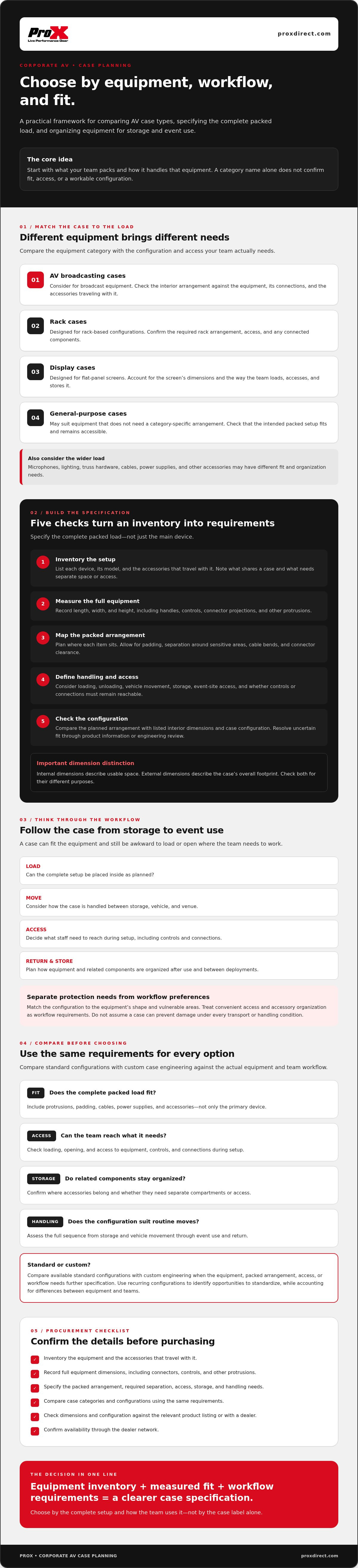
Build a Corporate AV Case Specification and Procurement Checklist
A shared case brief gives procurement staff, AV teams, and suppliers the same requirements to work from. It also helps distinguish confirmed product information from assumptions that still need checking. Use this checklist to document each recurring equipment configuration before comparing options.
What information should a case brief include?
- Inventory: Record equipment names and models, plus the accessories assigned to each case.
- Dimensions and orientation: List measured equipment dimensions, protrusions, intended position, and any clearance needed around controls or connections.
- Access: State which controls, connectors, or components staff need to reach during setup, and whether equipment must be removed to access them.
- Handling and storage: Describe who loads and moves the cases, where loading and storage take place, and the access conditions at event locations.
- Quantity and change: Specify the number of cases required and note planned equipment changes that could affect fit or configuration.
For each requirement, mark whether it has been measured or otherwise confirmed, or still needs a supplier or engineering review. Treat dimensions and features as confirmed only when they appear in the relevant product information. Do not assume external dimensions reflect usable interior space, or that a case includes a layout or access feature unless the listing confirms it.
How can teams evaluate standard versus custom cases?
Start with listed case categories when the equipment and workflow match a documented configuration. This can support consistency across repeated event deployments, provided the equipment, accessories, and handling process are genuinely alike. Avoid standardizing a case solely because equipment belongs to the same broad category. Different models or connection requirements may call for different layouts.
Consider custom engineering when measured dimensions or operational requirements do not align with listed configurations. Provide the complete packed arrangement and identify which details are fixed, preferred, or still under review. This gives the supplier or engineering team a clear basis for assessing the requirements rather than relying on estimates.
Procurement brief summary: “Specify each case against the measured equipment and accessories, required access, handling and storage conditions, and confirmed internal configuration; flag all unverified details for review.”
Use the brief to compare suitable categories in the case category catalog, then confirm product details and availability with the relevant listing or dealer before ordering.
Choose a Corporate AV Case Supplier and Confirm the Next Steps
Choosing a suitable case category is only the start. Before ordering, check that the specific model and configuration match your case brief, then confirm current ordering and availability details through the product listing or a dealer. ProX has engineered performance gear since 1984, which is useful context when evaluating the company’s experience, but it is not a substitute for checking claims about an individual case.
What should buyers confirm before placing an order?
Use the equipment inventory and specification as a final check. Confirm the exact case model, listed dimensions, internal configuration, included components, and intended equipment. If a measurement or fit detail is unclear, ask the dealer or engineering team to clarify it before proceeding. Verify ordering details and availability through the applicable sales channel. The worldwide dealer network provides a purchasing route, but does not establish local stock.
Make the confirmation specific. If a case is intended for a particular equipment model and its accessories, ensure the listing or supplier review addresses the complete configuration, not just the equipment category. Record confirmed details with the procurement documentation so the team can refer to the same specification during ordering and deployment.
How can case needs evolve as corporate AV inventories change?
Review the case brief when equipment models, accessories, or handling workflows change. A replacement unit may have different dimensions or connector positions, while a revised event process may change access needs. Keep case identifiers and inventory records aligned with the equipment assigned to each case. This makes mismatches easier to spot before the next move. For broader selection context, see this case engineering guide.
For corporate AV equipment transport cases, close the loop between requirements, product information, and the order: confirm the configuration, resolve open questions, and check availability with the relevant dealer. If the inventory or workflow no longer matches a listed configuration, equipment-specific custom engineering may be worth assessing.
Review the case category catalog against your approved brief, then confirm the specific case details with a dealer before ordering.
Specify Cases Around Your AV Workflow
Choosing corporate AV equipment transport cases starts with the complete equipment load and how your team handles it. Measure the equipment and accessories, confirm internal dimensions against the intended configuration, and consider access, storage, and handling together. Then compare AV broadcasting, rack, display, and general-purpose case categories against the actual workflow rather than relying on labels alone.
A clear case brief helps teams distinguish confirmed specifications from details that still need supplier or engineering review. Standardize recurring configurations when equipment and workflows genuinely match, and reassess them as inventories change. If a listed configuration does not suit a specific setup, custom case engineering is available for equipment-specific requirements.
ProX has engineered performance gear since 1984 and provides product access through a worldwide dealer network. These are useful points of context as you review options, while specific dimensions, configurations, and availability should still be confirmed for the case under consideration.
Use your equipment inventory and case brief to take the next step. Review corporate AV case options and identify configurations to verify with the relevant dealer. A methodical specification gives your team a practical foundation for consistent storage and event deployment.
Frequently Asked Questions
What should a corporate AV equipment transport case protect?
It should accommodate and help protect the equipment and accessories assigned to it during storage, loading, vehicle movement, unloading, and event setup. Consider vulnerable surfaces, controls, connectors, and components that could be affected by contact or pressure. Both the interior arrangement and equipment fit matter. A case cannot prevent every form of impact or handling damage, so match its documented configuration to the equipment and intended handling conditions.
How do I choose the right size case for AV equipment?
Measure the equipment, including protrusions, controls, and connector clearance, then account for padding and every accessory that travels with it. Compare the complete packed arrangement with the case’s listed internal dimensions, not its external measurements. Check the specific case configuration and confirm uncertain fit details with the listing, dealer, or engineering team. Do not assume unused space will automatically accommodate cables, power supplies, or other items safely.
Are rack cases suitable for corporate AV equipment?
Yes, a rack case may suit equipment organized around a rack-based configuration. Check that the rack arrangement and components match the case’s documented dimensions and configuration, and consider how the team will access connections during setup. Not every AV device belongs in a rack case. Displays, microphones, and broadcast equipment may suit other categories. Select based on equipment and workflow, then confirm the details against the relevant case listing.
When should a company choose a custom AV transport case?
Consider custom case engineering when equipment dimensions, accessory placement, access points, or handling requirements do not align with a listed configuration. Start by documenting the complete equipment load and how staff need to use the case. This gives the engineering team specific requirements to assess. ProX offers custom case engineering for equipment-specific needs. Confirm the proposed configuration against your measurements and operational requirements before ordering.
What information should I provide when requesting an AV case recommendation?
Provide equipment names and models, measured dimensions, protrusions, intended orientation, and the accessories that will travel with each unit. Describe required access to controls or connectors, storage conditions, loading and unloading, event-site handling, and the quantity needed. Identify which details are confirmed and which are assumptions, and note upcoming equipment changes that could affect fit. A clear brief helps the dealer or engineering team assess the actual configuration rather than the category alone.
Do corporate AV cases meet ATA Spec 300 requirements?
Not necessarily. Do not assume a corporate AV case meets ATA Spec 300 based on its category or intended use. If the specification matters to your shipping or procurement requirements, ask the supplier for documentation identifying the applicable claim and its supporting evidence. Assess interior fit separately: a standard reference does not by itself confirm that the case’s internal configuration suits the equipment being packed.
Can one case configuration work for different AV equipment models?
It can, if each model and its accessories fit the documented interior arrangement and the required access remains practical. Compare dimensions, connector positions, controls, and intended orientation across the models instead of relying on a shared product category. If one configuration does not suit every unit, record which equipment belongs in each case. Recheck fit when equipment is replaced or the packed accessory set changes.
How can a company organize AV cases for repeated events?
Assign each case a clear identifier and link its equipment inventory to that identifier. Document the configuration, accessories, and handling or access notes so event teams can check contents before and after deployment. Standardize recurring case setups only where equipment and workflows genuinely match. Review records when inventory or event processes change, and confirm that each case still corresponds to its assigned equipment.
Disclaimer
Any trademarks, trade names or brand names appearing herein that do not belong to ProX are the property of their respective owners and/or companies, and such appearance doesn't and shall not constitute or imply endorsement, sponsorship or recommendation by ProX.


