

A case can fit every component and still slow a production team down. Choosing a mobile workstation case for event production means looking beyond equipment dimensions to how the gear will be accessed, connected, and operated at the venue.
Dimensions are a sensible starting point, but they do not answer every buying question. The internal layout must accommodate the workstation and associated equipment, while the case configuration should support efficient setup without compromising transport protection. A fixed, modular, or custom arrangement may suit different equipment and workflows.
This guide explains how to assess fit, protection, access, and transport requirements before requesting a quote or placing an order. It also outlines when a standard workstation or AV broadcasting case may be appropriate, and when equipment-specific custom engineering may help. ProX offers both workstation and AV broadcasting case categories, with custom case engineering for equipment-specific requirements. Use the selection framework to define the configuration your production workflow needs.
Key Takeaways
- Start with the complete equipment inventory and working layout, not dimensions alone, when defining a mobile workstation case for event production.
- Verify internal dimensions, required clearances, payload limits, and compatibility against the specific case listing.
- Compare fixed, modular, and custom configurations by how they support access, handling, storage, and transport in your workflow.
- Separate essential requirements from preferences to keep the case specification practical and avoid unnecessary complexity.
- Explore ProX Workstations, AV Broadcasting Cases, and custom case engineering as relevant options, then check individual listings for model-specific details.
Mobile Workstation Case Requirements for Event Production
A mobile workstation case for event production is a transport enclosure planned around the equipment it contains and the configuration needed to operate it. Its purpose is to organize and enclose production gear for movement between venues while accounting for how the operator will access and use it. Protection capabilities depend on the case’s design and specifications, so verify claims against the product listing rather than assuming a category name guarantees a particular level of protection.
Production schedules can involve repeated venue moves, constrained load-in periods, and operating environments that vary from one event to another. A transport-only enclosure may be suitable if equipment is removed before use. A workstation-oriented case may be a better fit if the setup needs organized access during operation. Transport protection and working access are related, but they are not interchangeable. Prioritize both, then confirm that the selected configuration supports them.
Which event-production roles use mobile workstation cases?
Production, AV, broadcast, and show-control teams may all use workstation cases, but their equipment lists and operating layouts differ. A show-control operator’s access needs may not match those of a broadcast setup. Start with the person operating the equipment, the devices and connections involved, and the venue layout. If the equipment aligns with that category, compare AV broadcasting cases and check each listing for relevant details.
How does a workstation case differ from a general transport case?
A general transport case primarily encloses equipment for movement and storage. A workstation-oriented design also considers how gear is arranged and accessed during use, though features vary by model. The Road case overview provides foundational context on transport cases. For a broader equipment comparison, review the ProX Cases category, then verify dimensions, clearances, payload limits, and operating access against the specific listing.
Before comparing options, map the working setup: what stays in the case, what operators must reach during use, and what needs to be removed at the venue. This helps separate essential access and organization requirements from preferences. For example, if a control or connection needs to remain accessible during a show, include that requirement in the layout rather than checking only whether the equipment fits. A case that suits the transport route but obstructs routine operation may add setup friction. A layout that works at the venue still needs to match the equipment and the case’s stated limits.
How Equipment Fit, Protection, and Access Shape Workstation Case Design
Plan the interior around the complete equipment list and the arrangement used during operation, not just the largest component’s dimensions. Connectors, protrusions, accessories, and cable bends can affect usable space. Compatibility depends on the actual case and equipment specifications, including usable interior dimensions, clearances, equipment weight, and stated case limits.
Protection requirements also depend on the route and handling conditions. Assess how the case will be lifted, moved, stored, and stacked, as well as possible exposure to dust or moisture at venues. Treat these as criteria to verify against case-specific documentation, not as outcomes guaranteed by the workstation category. For general case terminology, see Wikipedia; equipment fit and protection still require checking the relevant product documentation.
What should you measure before choosing a workstation case?
Record each device’s dimensions, including connector extensions and protrusions, then note the cable clearance needed in the planned arrangement. Add accessories and compare the complete layout with the case’s verified usable interior dimensions, not just its exterior size. Confirm equipment weight and the case’s stated limits in the relevant product documentation before treating a configuration as compatible.
How should operators assess access and internal layout?
Map the controls, connections, and components operators must reach during production. Mark intended cable routes and any service access needs, then check whether the specific model supports them. Do not assume a case includes cable management or a particular access feature. If verified requirements do not fit a standard configuration, consider discussing equipment-specific needs through custom case engineering.
- Measure: devices, connectors, protrusions, and cable clearance.
- Lay out: equipment and accessories as they will be arranged in use.
- Verify: usable interior dimensions, weight, case limits, and documented protection details.
- Assess: handling, stacking, environmental exposure, and operator access.
Use this information to compare requirements with the ProX case category. For equipment-specific needs that a standard configuration may not address, review ProX workstation case options and confirm details against the relevant listing.
Compare Workstation Case Configurations for Your Production Workflow
The right configuration depends on equipment fit, how operators use it, and how often it moves. A touring workflow may emphasize repeated handling and compact storage. A fixed-venue setup may prioritize access to equipment that stays in place, while broadcast work may require a layout shaped around specific devices and connections. These are selection priorities, not guaranteed features of any case type.
| Configuration or workflow | Equipment fit | Operating access | Handling and storage | Transport requirements |
|---|---|---|---|---|
| Standard-category case | Compare the documented equipment list with verified interior dimensions and limits. | Check whether the model’s stated layout supports the controls and connections operators need. | Review listed dimensions and handling details against storage and venue constraints. | Confirm the case’s stated protection and transport capabilities for the intended use. |
| Custom-engineered option | Consider it if verified dimensions or an unusual equipment combination do not align with standard options. | Discuss access needs that available configurations may not address. | Specify relevant storage and handling constraints for case-specific review. | Define the route and protection requirements, then confirm what can be engineered. |
| Touring workflow | Allow for the complete equipment setup and associated accessories. | Balance access during operation with enclosure during movement. | Assess repeated handling and available storage space. | Confirm suitability against actual transport conditions and listing details. |
| Fixed-venue workflow | Prioritize compatibility with equipment that stays at the venue. | Focus on the operator’s routine access and working position. | Consider storage between events and movement within the venue. | Assess transport needs between storage and the operating location. |
| Broadcast workflow | Match the case to the specific devices and their arrangement. | Map required access to controls, connections, and components. | Account for venue storage and the planned equipment layout. | Verify the case’s specifications against the intended handling conditions. |
Transport-cycle ratings can provide useful context when evaluating reusable shipping containers. Novapor’s overview of ATA 300 categories offers general reference, but a category does not replace checking the specific case listing for documented performance and limits.
When is a standard workstation or AV case a practical fit?
A standard option may work when its documented dimensions, limits, and configuration align with the equipment and workflow. Compare those requirements with verified product details rather than relying on category labels alone. Use ProX case categories as a starting point, and review individual listings for model-specific specifications.
When should you consider a custom-engineered case?
Investigate custom engineering if equipment dimensions, an unusual combination of devices, or required operator access do not fit the available standard configurations. Define the equipment, intended layout, and protection requirements first. Project scope, materials, and engineering requirements need case-specific discussion. Do not assume a particular fit, feature, lead time, or outcome before review.
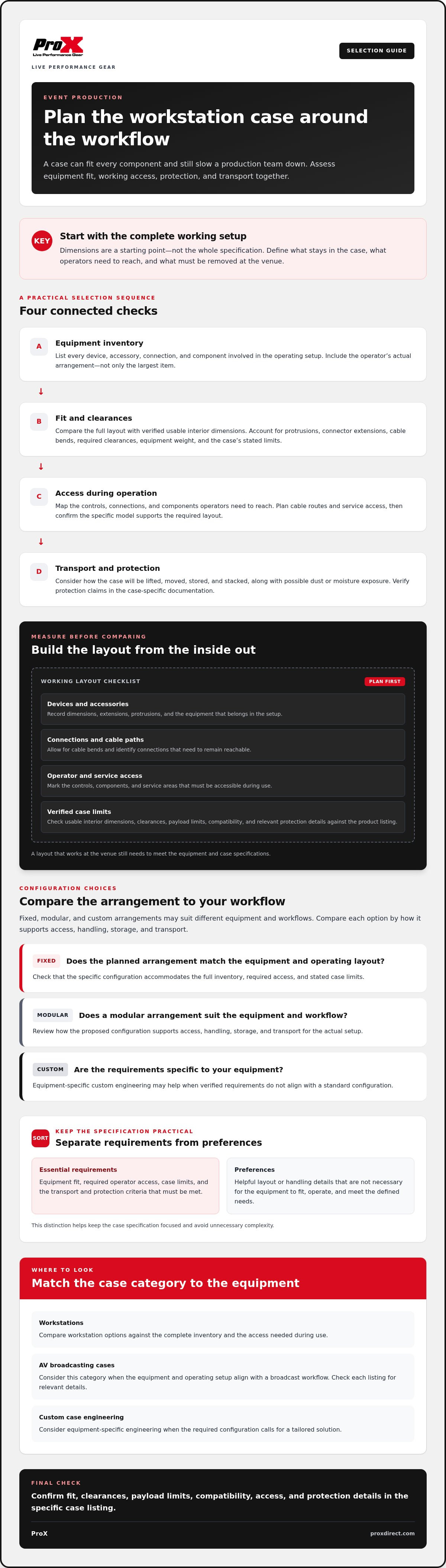
Use This Checklist to Specify a Mobile Workstation Case
A clear specification helps you compare options and identify requirements that need further review. For a mobile workstation case for event production, separate must-haves, such as verified equipment fit and access to essential controls, from preferences that can be adjusted if they add complexity without supporting the workflow.
What information should you prepare before comparing cases?
Build an equipment inventory before reviewing listings. Include every device, accessory, cable, and component that must travel together. Record measurements and weights, note protruding connectors and required cable clearance, and sketch the intended arrangement. Add operating positions and handling constraints, including what must remain accessible during use and who will operate the workstation.
What questions should you ask before ordering?
Use the inventory to check each candidate against documented specifications. Confirm usable internal dimensions, payload limits, construction details, and exactly which components are included. If an important requirement is not clear in the listing, ask the relevant seller or dealer to verify it for that case.
For needs that appear to require a non-standard configuration, ask what may require custom engineering and how the project specifications are reviewed. Confirm ordering, shipping, and support details through the relevant dealer or listing. Do not assume compatibility, materials, included components, or a particular outcome without case-specific confirmation.
- 1. Inventory: List all equipment and components that must travel together.
- 2. Measure: Record dimensions, weights, connector protrusions, and cable clearances.
- 3. Map the workflow: Note operator position, essential controls, access needs, and handling constraints.
- 4. Set priorities: Mark requirements as must-haves or preferences to avoid unnecessary complexity.
- 5. Verify listings: Check usable interior dimensions, payload limits, construction details, and included components for the exact case.
- 6. Ask questions: Confirm unclear specifications, custom-engineering review, ordering, shipping, and support details with the relevant seller or dealer.
Keep the checklist with your equipment layout when comparing products. If AV equipment is central to the configuration, compare AV broadcasting case options and verify each listing against your requirements before proceeding.
Explore ProX Workstations and Plan Your Next Step
Once your equipment inventory and operating requirements are defined, compare them with ProX Workstations and AV Broadcasting Cases. These are relevant categories for event-production setups, but category names alone do not confirm compatibility. The right match depends on the exact equipment, case configuration, access requirements, and stated limits. Use your checklist to narrow the options, then review individual listings before selecting a mobile workstation case for event production.
Which ProX case information should you review?
Start with the workstation and case categories that align with your equipment and workflow. Compare listing details with your documented dimensions and requirements. Check the information provided for each case, including dimensions, materials, included components, and any stated weight or payload limits. If a detail you need is not listed, confirm it through the relevant dealer before making a decision.
ProX has engineered performance gear since 1984. That history provides company background, but it does not establish the specifications or performance of a particular case. Evaluate each model on its own documented details. If standard configurations do not appear to address equipment-specific dimensions or protection requirements, custom case engineering may be worth discussing. The project’s requirements need review before assuming a particular design or outcome.
How can you move from requirements to a case selection?
Prepare your inventory, measurements, intended layout, and must-have access requirements before contacting a dealer or exploring custom engineering. Ask the dealer to confirm compatibility against both the exact equipment and the case specifications. This keeps the discussion focused on measurable fit and documented features rather than assumptions based on category labels.
ProX serves customers worldwide through a dealer network. Ordering options and product details can vary, so verify the relevant process with the dealer or listing for your location. Keep a record of any specifications that need confirmation, including dimensions, construction details, included components, and stated limits. Resolve those questions before choosing a configuration.
Review the available case categories, compare relevant listings, and follow up with a dealer if your equipment requirements need clarification. Explore ProX case options as a practical next step, with your checklist in hand.
Choose a Case That Supports the Whole Workflow
The best mobile workstation case for event production is selected around the equipment it must contain and the way operators need to use it. Start with a complete inventory, then verify dimensions, weight limits, included components, and access against the exact case listing. Compare standard categories with custom case engineering when your documented requirements do not align.
ProX offers Workstations and AV Broadcasting Cases, along with custom case engineering for equipment-specific requirements. The company has engineered performance gear since 1984 and serves customers worldwide through a dealer network. These are useful starting points, but model-specific compatibility and ordering details still need confirmation through the relevant listing or dealer.
With your requirements defined, compare options methodically and ask focused questions before choosing a configuration. Explore ProX case options and identify a suitable next step for your production setup.
Frequently Asked Questions
What is a mobile workstation case for event production?
A mobile workstation case for event production is an enclosure planned around production equipment and its working arrangement. It supports moving the equipment between locations while accounting for how operators need to access it during use. The intended setup may include a workstation and related devices, cables, or accessories. Case design and protection capabilities vary, so check the individual listing rather than assuming every workstation case provides the same features.
How do I choose the right workstation case for my production equipment?
Choose a case by comparing your full equipment setup and operating workflow with documented case specifications. Inventory every device and accessory, measure dimensions and protrusions, record weights, and identify controls or connections that must remain accessible. Then check usable interior dimensions, payload limits, configuration details, and stated protection information for each specific case. If a listing does not answer a critical compatibility question, confirm it with the relevant seller or dealer before ordering.
Can a workstation case protect equipment while allowing access during operation?
Some workstation configurations may combine an enclosure for transport with access to equipment during operation, but the details depend on the specific model. Identify which controls, connections, and components operators need to reach, then compare those needs with the case layout and listed features. Assess protection requirements separately, including handling and environmental conditions. Verify any claims about protection and access against the product listing. Do not infer performance from the case category alone.
What measurements should I take before ordering a mobile workstation case?
Measure every device, including connector extensions, protrusions, and any clearance needed for cables. Record equipment weights, accessories, and the intended arrangement, then compare the complete layout with verified usable interior dimensions. Note the operator’s position and required access during use as well. Check the product documentation for the case’s stated payload limit and other relevant constraints. Exterior dimensions alone are not enough to confirm that equipment will fit or function as intended.
When should I choose a custom-engineered workstation case?
Consider custom case engineering when verified equipment dimensions, an unusual combination of devices, or specific access requirements do not align with available standard configurations. Prepare the equipment inventory, measurements, intended layout, and protection requirements for a case-specific discussion. Project scope, materials, and engineering requirements need review before anyone can confirm a design or compatibility. Custom engineering may help address equipment-specific needs, but do not assume a particular feature, fit, timeline, or outcome before review.
Are AV broadcasting cases suitable for event-production workstations?
AV broadcasting cases may be relevant when their documented configuration matches the equipment and operating workflow. Suitability depends on the particular devices, required access, dimensions, and case limits, not the category name alone. Compare the equipment list with the individual listing and confirm unclear specifications with the relevant seller or dealer. ProX offers AV Broadcasting Cases and Workstations, but each case must be assessed on its own stated details.
What specifications should I verify before purchasing a workstation case?
Verify the usable interior dimensions, payload limits, construction materials, included components, and any stated protection details for the exact case. Compare those specifications with equipment measurements, total weight, cable clearance, and access needs. Check handling and storage constraints against your production workflow, too. If a relevant detail is not provided in the listing, ask the seller or dealer to confirm it. Avoid relying on category descriptions as a substitute for model-specific documentation.
Disclaimer
Any trademarks, trade names or brand names appearing herein that do not belong to ProX are the property of their respective owners and/or companies, and such appearance doesn't and shall not constitute or imply endorsement, sponsorship or recommendation by ProX.


