

What should a streaming case protect first: the equipment, the signal chain, or the workflow that gets a production on air? These needs are connected. A custom case for live streaming equipment must account for device dimensions, connected cabling, and how components are handled between setups. A standard case may fit the hardware yet leave key connections difficult to reach.
Case planning should start with the complete rig, not just an equipment list. Define what travels together, what needs protection during handling, and what operators need to access during setup. ProX custom case engineering designs and builds cases around specific equipment dimensions and protection requirements.
This guide explains how to specify a case around your equipment, signal chain, and production workflow. You’ll learn which dimensions and cable details to document, how to plan access and accessory organization, and what information to prepare for a custom case project. The aim is a case that supports equipment protection and a consistent setup.
Key Takeaways
- Specify a custom case for live streaming equipment around the complete production rig, not just its primary device.
- Record connector locations, cable paths, and operator access needs to help define a usable layout.
- Compare a standard case and a custom build by how well each matches your equipment configuration and project requirements.
- Prepare equipment models, quantities, measurements, and reference images to make your project brief specific.
What should a custom case for live streaming equipment protect?
A live-streaming production rig is a connected system, not just a camera or switcher. It may include video switchers, encoders, capture devices, audio equipment, monitors, cables, and accessories. A custom case for live streaming equipment is designed around the actual dimensions of the identified equipment and the protection needs of that setup.
Equipment fit describes what the case holds; workflow planning describes how the crew handles it. Both matter. A case can fit the devices but still slow production if essential components are hard to reach or accessories are difficult to organize. For general background, Wikipedia describes a case as a shipping container specifically designed to protect equipment during transport.
Protection priorities depend on equipment value, handling frequency, and conditions between locations. A rig moved occasionally may have different handling demands from one that is packed and unpacked often. Before defining case requirements, identify how the rig will be transported and handled. Avoid assuming that the same protection approach suits every production.
Which parts of a streaming rig need a defined place?
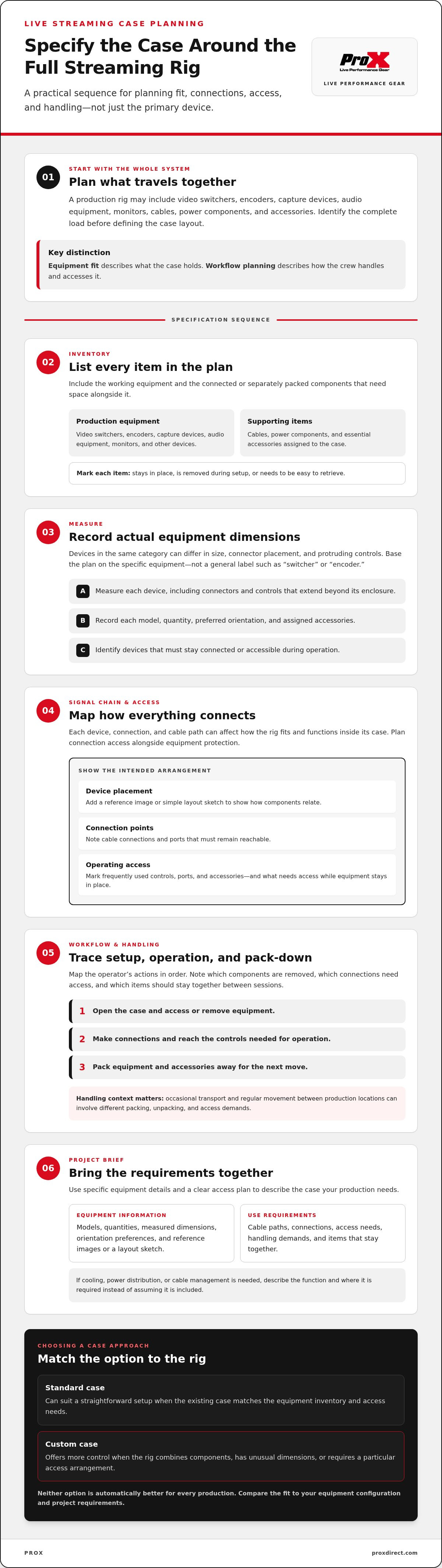
Start with an inventory of the equipment that will travel together. Include items belonging in the rig, as well as connected or separately packed components that need space alongside it. For each item, note whether it stays in the case or comes out during setup.
- List video switchers, encoders, capture devices, and other production equipment.
- Include cables, power components, and essential accessories.
- Separate equipment that stays in place from removable items used during setup or operation.
This distinction helps establish what needs a stable position and what should be easy to retrieve. Include cables and accessories from the start: they are part of the working system and affect how the full load is organized.
How does production use change case requirements?
Handling frequency shapes case priorities. Occasional transport may involve fewer setup cycles, while regular movement between production locations means repeated packing, unpacking, and access. Map the operator’s actions during setup, operation, and pack-down. Note which components must be removed, which connections need access, and which items should stay together between sessions.
ProX’s AV broadcasting cases category is relevant when evaluating cases for production equipment. For a custom project, use the equipment inventory and handling requirements to define protection needs and the intended workflow before specifying the case.
How do fit, access, and the signal chain shape a custom streaming case?
Case dimensions need to reflect the equipment itself, not a broad category such as “switcher” or “encoder.” Devices in the same category can differ in overall size, connector placement, and protruding controls. Plan a custom case for live streaming equipment using actual measurements and the operating layout the production requires.
The complete signal chain matters because each device, connection, and cable path affects how the rig fits and functions inside its case. Planning only for equipment protection can leave ports difficult to reach or cables awkward to connect. Protection and operational access are distinct design considerations, and both affect component placement.
What dimensions and equipment details should buyers record?
Measure each item, including controls or connectors that extend beyond its main enclosure. Record the equipment model, quantity, preferred orientation, and accessories included in the case plan. Note which devices must remain connected or accessible during operation. These details give the project brief a more useful basis than model names or general equipment categories alone.
- Measure each device, including protruding controls and connectors.
- List quantities, orientation preferences, and accessories assigned to the case.
- Identify components that need to stay connected or remain accessible during use.
Reference images or a simple layout sketch can show how components relate to one another. Where possible, include cable connections so the case plan reflects the intended arrangement, not just separate equipment outlines.
How should the case support setup and operation?
Map the operator’s sequence: opening the case, removing or accessing equipment, making connections, operating controls, and packing everything away. Mark frequently used ports, controls, and accessories. If a cable needs to connect while equipment remains in place, document the connection point and the access required. This turns workflow into a practical layout requirement.
Keep the brief focused on defined needs. If the project requires cooling, power distribution, or cable management, describe the function and where it is needed rather than assuming it is part of the case. If a project also references a reusable-container specification, consult the official ATA Spec 300 publication when defining that requirement.
For production equipment, ProX AV broadcasting cases are a relevant category to compare with your measured dimensions and access plan.
Custom or standard case: which option suits your streaming rig?
The choice depends on how closely an existing case matches the equipment inventory and how the crew needs to access it. A standard case can suit a straightforward setup. A custom case for live streaming equipment offers more control when the rig combines components, has unusual dimensions, or requires a particular access arrangement. Neither option is automatically better for every production.
| Consideration | Standard case | Custom case |
|---|---|---|
| Fit | Works when the actual equipment dimensions align with the case. | Designed around identified equipment dimensions and protection requirements. |
| Equipment configuration | Suited to a simple setup with limited layout needs. | Can be planned around combined equipment, accessories, and their arrangement. |
| Access | Suitable when existing access and packing arrangements meet the workflow. | Can account for project-specific access needs during setup and operation. |
| Project requirements | Best assessed against the actual inventory and handling needs. | Useful when those needs call for a defined, project-specific layout. |
When can a standard case be a practical choice?
A standard case may suit a compact, straightforward rig when its dimensions and layout match the equipment. Compare the case with your actual inventory, including accessories and handling needs. Don’t decide by equipment label alone: verify that the devices fit as intended and that routine setup does not depend on access the case cannot provide.
When does a custom build add useful control?
Custom engineering is useful when a rig combines several components, includes equipment with unusual dimensions, or needs a specific access sequence. Planning the equipment and accessories together can align the case layout with a repeated production workflow. ProX custom case engineering is tailored to project requirements, so a clear brief helps define the intended fit, protection, and access.
Case selection is one part of safe production handling. The University of South Florida outlines audio-visual workplace risks, including hazards such as fall from heights; case choice does not replace safe lifting or electrical practices. To compare available categories with your inventory, browse the ProX cases catalog and assess the fit against your operating requirements.
How to prepare a clear custom case specification
A well-prepared project brief gives case engineering a defined starting point. For a custom case for live streaming equipment, document the complete equipment set, how it is handled, and what operators need to access during production. Clear priorities distinguish essential functions from preferences and keep the project focused on the actual rig.
What should the buyer include in the project brief?
Begin with an inventory. Record each component’s model, quantity, dimensions, and intended orientation. Measure the equipment itself, including protruding controls and connectors, rather than relying only on category names. Add accessories and cables that travel in the case, and identify items packed separately.
- Equipment: List every device, model, quantity, and preferred orientation.
- Dimensions: Record actual measurements and note protrusions that affect fit.
- Use: Describe transport context, handling frequency, and production access needs.
- Visual references: Include photos or layout images where available.
- Priorities: Separate required functions from optional preferences.
Describe how the rig moves between locations and what happens at setup and pack-down. Note which components must remain connected, which need to be removed, and which controls or ports operators use during production. This context clarifies whether the case is intended mainly for packed transport, frequent handling, or both.
How does the custom engineering conversation proceed?
A complete brief helps scope the project around the identified equipment rather than assumptions about a typical streaming rig. ProX custom case engineering is tailored to project requirements, with fit, protection needs, and intended access informing the design. Reference images help communicate the arrangement, while measurements and equipment details establish the physical requirements.
Be explicit about trade-offs. If compact packing is essential, identify it as a requirement; if a layout preference can change, label it accordingly. This keeps the design discussion anchored to operational needs. Project quotations reflect engineering, materials, and manufacturing complexity, so a clear scope gives the project a more precise basis.
Use your brief to guide the discussion of bespoke case engineering, including the equipment configuration and required access. You can also review relevant case categories in the ProX case catalog.
Choose a custom streaming case built around production requirements
The right case direction follows production requirements, not a general equipment label. Compare the inventory with the intended dimensions and internal arrangement, then assess protection needs, operational access, and the crew’s workflow. A standard case may suit a straightforward setup when its fit and layout align. Consider a custom case for live streaming equipment when the defined rig calls for project-specific dimensions or access.
What to compare before settling on a case direction
Use the project brief to compare options against the actual equipment and how it is used. Check that the planned arrangement fits the inventory, including accessories, and that operators can reach the controls or components they use during production. State protection requirements in relation to handling and transport. This makes the decision easier to evaluate without assuming custom construction is automatically the better choice.
- Fit: Compare the equipment inventory with the case’s intended dimensions and arrangement.
- Workflow: Review access needs and accessory organization against setup and pack-down tasks.
- Protection: State the handling and transport requirements the case must address.
Where to explore relevant case options
ProX custom case engineering is tailored to equipment and project requirements. Use the defined rig, protection priorities, and access needs to set the scope of a custom project. This keeps design considerations tied to production use rather than assumptions about a typical setup.
For a relevant category, explore AV broadcasting cases for production equipment. If the equipment arrangement or workflow calls for a tailored build, use the project requirements to define the custom case design. Start with the inventory and intended use, then compare the case direction with the rig’s needs.
Build a Case Plan Around Your Production Workflow
A useful case specification starts with the complete streaming rig, not a single device. Record actual equipment dimensions, connector and access needs, included accessories, and how the setup is handled between productions. Then compare a standard case with a custom layout based on fit, protection requirements, and operator workflow.
A custom case for live streaming equipment can be designed around those defined requirements. ProX has engineered performance gear since 1984, and its custom case engineering is tailored to project requirements. A clear inventory and practical description of setup, operation, and pack-down give the project a useful foundation.
Review the equipment and workflow details you’ve gathered, then compare your needs with ProX case options in the FAQ and case categories below.
Frequently Asked Questions
What should I include in a custom case brief for live-streaming equipment?
Include a complete equipment inventory and an operating brief. For a custom case for live streaming equipment, list each device’s model, measured dimensions, preferred orientation, and protruding controls or connectors. Add cables and accessories, and identify components that stay connected during operation. Describe how the rig is handled and transported, and what operators need to access during production. Separate essential requirements from preferences so the project discussion can focus on the actual setup.
Is a custom case better than a standard case for streaming equipment?
No, a custom case isn’t automatically better. A standard case may suit equipment with straightforward dimensions and limited layout requirements, provided its fit and access meet the rig’s needs. A custom build may be more appropriate for combined components, unusual dimensions, or specific access and organization requirements. Compare both options against the full equipment inventory, protection priorities, and production workflow before deciding which direction fits the project.
How do I measure live-streaming equipment for a custom case?
Measure each item in its actual configuration, including handles, controls, connectors, or other protrusions that affect fit. Record dimensions consistently and note the preferred orientation of each device. Include accessories and explain which items operators need to reach during production. Equipment models and reference images provide useful context, but they should not replace measurements. These details help describe the intended arrangement clearly in a project brief.
Can a custom case keep streaming equipment connected during operation?
That depends on the equipment arrangement and access requirements defined for the project. Identify which devices need to remain connected, which ports operators must reach, and how the rig is used during production. Include cable and connector details in the specification so they inform the design. Describe the intended workflow and required access as part of the project requirements.
What information affects the scope of a custom streaming case project?
Project scope depends on equipment dimensions and quantities, required materials, protection requirements, and manufacturing complexity. Handling, transport, and operating context can also shape the brief. ProX quotes custom case engineering projects individually, based on engineering, materials, and manufacturing complexity. Provide a complete inventory and distinguish essential requirements from preferences to give the project discussion a clear basis.
What equipment can a live-streaming case be designed to hold?
A case project can be scoped around the specific equipment identified in its brief. A streaming setup might include a video switcher, encoder, capture device, or other production components, but each rig differs. List the actual devices, quantities, accessories, and dimensions rather than assuming a standard package. Describe how the components connect and which items need access during operation so the case plan reflects the intended setup.
Ready to define a case around your production rig? Explore ProX case solutions and start with your equipment inventory, measurements, and workflow requirements.
Disclaimer
Any trademarks, trade names or brand names appearing herein that do not belong to ProX are the property of their respective owners and/or companies, and such appearance doesn't and shall not constitute or imply endorsement, sponsorship or recommendation by ProX.


