
A case can protect every component and still slow a crew down if the right cable, control surface, or accessory is buried at setup. Touring production cases work best as mobile workflow systems: the layout should match the equipment inside, the tasks it supports, and the demands of repeated loading and transport. Choosing by exterior size alone can leave access, storage, and changeover needs unresolved.
Production teams need to balance equipment fit and protection with practical access, clear organization, and efficient setup. This guide explains how to assess those requirements, compare storage cases with rack-based and workstation formats, and decide when a custom build is appropriate. It also covers load-in sequence, component access, and the space available in vehicles and backstage work areas. ProX Live Performance Gear manufactures cases for live-event production, with custom case engineering for equipment dimensions and protection requirements.
Key Takeaways
- Match touring production cases to the equipment and production task, rather than choosing by exterior size alone.
- Plan access around crew tasks, and treat drawers, rack space, shelves, and access panels as layout choices.
- Compare storage, rack, workstation, and custom-built formats by equipment type, access needs, and layout complexity.
- Record equipment dimensions separately from the internal clearance and storage space the case layout requires.
- Use a standard configuration when it fits the workflow; consider a custom build when equipment dimensions or protection requirements call for a tailored layout.
What Touring Production Cases Need to Do on the Move
A touring production case is a transport case organized around equipment assigned to a specific production task. It needs to fit the gear and support how the crew retrieves, sets up, stores, and packs it.
Protection and workflow are related, but they’re different requirements. A case can secure equipment during handling yet make setup cumbersome if controls are hard to reach or accessories are mixed together. Production managers, AV technicians, touring musicians, and lighting crews handle different equipment and follow different work sequences. The case layout should reflect its intended role.
How production cases differ by crew role
Production managers may need a mobile work area that keeps documents, screens, and frequently used equipment accessible. Audio teams may prioritize space for a mixer or rack equipment, with separate storage for microphones and accessories. Lighting crews need a layout suited to their equipment, while video and broadcast teams can group related components for access during setup. ProX offers production case categories for distinct applications, including mixer console, microphone, lighting, and AV broadcasting cases.
Why case layout affects a production day
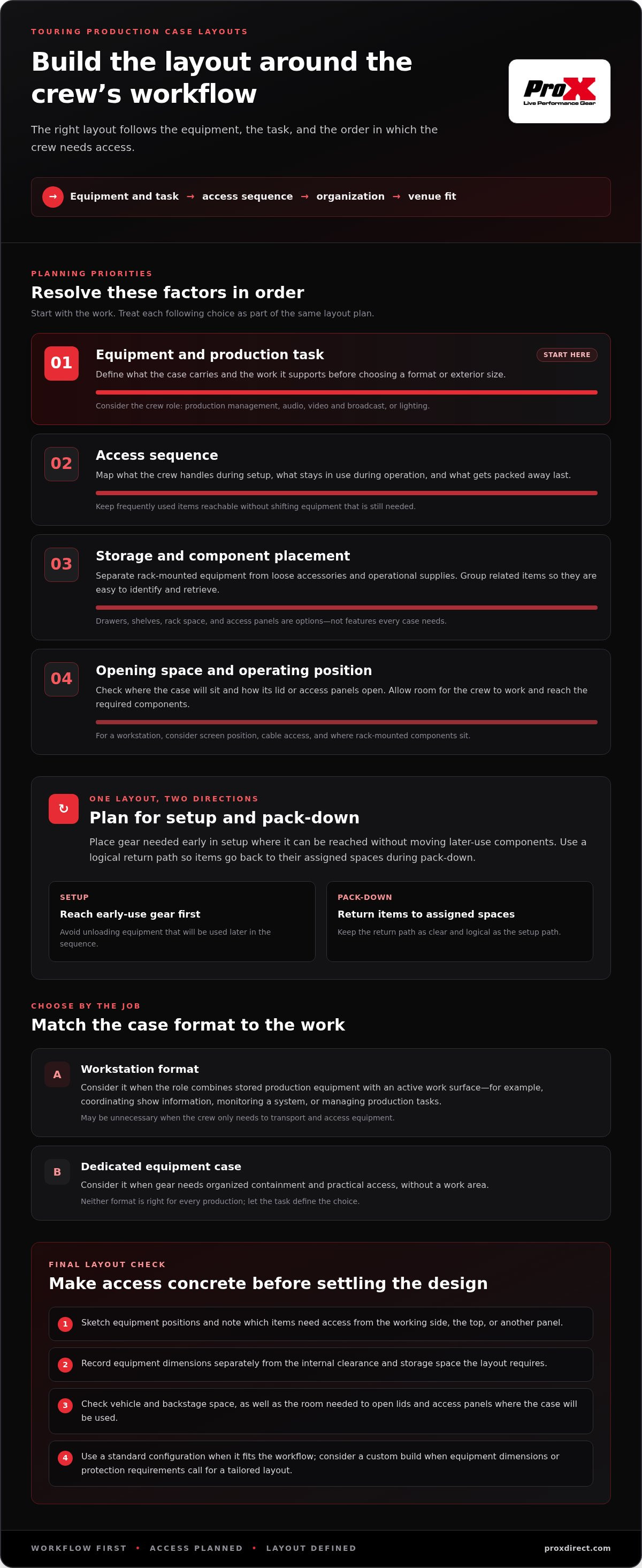
Clear organization helps crews identify and retrieve equipment without sorting through unrelated items. Place gear needed early in setup where it can be reached without moving components that will be used later. The same principle applies during pack-down: a logical return path helps the crew put items back in their assigned spaces.
Opening direction and compartment placement also affect how a case works in a venue. A lid or access panel needs room to open where the case will be positioned. Shelves, drawers, and rack areas support different tasks, but they’re layout options, not features every case needs. Consider who handles each item, when it’s used, and what else must move to reach it.
For touring production cases, start with the work. Identify the equipment, its role, and the crew’s access sequence. A workstation may suit a task that combines equipment storage with an active work surface. A dedicated equipment case may be a better fit when gear needs organized containment without a work area. Neither format is right for every production.
- Production management: Consider access to documents, screens, and equipment used while coordinating a show.
- Audio operations: Group mixers, rack equipment, microphones, or accessories according to how the crew handles them.
- Video and broadcast: Organize related components for practical access during setup and pack-down.
- Lighting operations: Base internal organization on the crew’s equipment and handling sequence.
The right layout follows the equipment and task, not a universal template. Define those requirements first, then compare case formats against the crew’s actual workflow.
How Touring Production Case Layouts Support Workflows
A case layout should follow the order in which the crew works. Group equipment used together, and keep items needed repeatedly during setup or operation accessible without shifting other gear. Internal organization is a workflow decision, not simply a matter of adding compartments.
Case layout should match crew access: the easier it is to reach the right equipment at the right stage, the more naturally the case supports the production workflow. Drawers, rack space, shelves, and access panels are possible layout choices, not standard features to assume. Include each only when it serves a defined task.
When a production workstation makes sense
A workstation can suit a role that needs both a working surface and stored production equipment in one case. Examples include coordinating show information, monitoring a system, or managing production tasks from a compact work area. It may be unnecessary when the crew only needs to transport and access equipment, with no work surface required.
Plan around the actual operating position. Where will a screen sit in relation to the person using it? How will cables reach the equipment, and can connections be accessed without moving stored items? Where should rack-mounted components sit so the operator can work comfortably and the crew can reach them during setup? These questions define the required layout without assuming a particular workstation configuration.
Planning storage, rack space, and access
Start by separating equipment that needs rack installation from loose accessories and operational supplies. Rack-mounted units have a defined position in the working setup. Cables, adapters, documents, and other small items may need separate storage to keep them identifiable and prevent them from obstructing access. Shelves or drawers can help organize those items when the task and case dimensions support them.
Next, map access by production phase. Identify what the crew handles during setup, what remains in use during operation, and what gets packed away last. Frequently used items should be reachable without unloading equipment that’s still needed. Consider the location and opening direction of access panels in relation to where the case will sit, as well as the space needed to open them.
For mobile AV and broadcast workflows, grouping related equipment around its setup sequence can make the internal arrangement easier to use. Explore AV broadcasting cases as one format to consider when planning equipment grouping and access.
Before settling on a layout, sketch the equipment positions and note which items need access from the working side, the top, or another panel. Keep the arrangement tied to real crew tasks. A simpler layout may serve a focused equipment role, while a workstation may suit a combined operating and storage task. Choose according to what the production team needs to do with the case at each stage.
Compare Touring Production Case Formats Before Choosing
Compare formats by the job they perform, not by how much equipment they can hold. A case designed to transport and organize gear has a different purpose from one intended to support work at the venue. The right choice depends on equipment dimensions, access requirements, and the crew’s operating sequence.
Use these criteria to assess touring production cases without treating one format as a universal upgrade:
- General storage case: Suits grouped equipment and accessories when the crew doesn’t need a built-in work surface or rack installation. Choose the organization based on how often the contents are retrieved.
- Rack case: Suits equipment that requires rack installation as part of its operating setup. Consider how the crew connects to and accesses those components during setup and use.
- Workstation: Suits tasks that combine stored equipment with a working area. The layout should support the operator’s actual tasks, rather than add a work surface the crew won’t use.
- Custom-built case: Suits requirements that don’t fit a standard configuration, such as unusual equipment dimensions, combined gear, or specific access needs. The layout should follow the equipment and task.
Standard storage, rack case, or workstation?
Start with the simplest format that accommodates the equipment and workflow. General storage may suit grouped accessories or components that don’t need to be operated inside the case. Choose a rack-oriented layout when the equipment and operating setup call for rack installation. A workstation makes sense when the crew needs both equipment storage and a usable work area. Combining functions doesn’t automatically make it the better choice.
Ask what the crew needs to do at the venue. If the case only needs to contain and protect equipment between uses, a work surface may add unnecessary layout complexity. If staff need to operate or coordinate equipment from a dedicated position, a workstation may better support that task. In either case, evaluate access with the case placed where it will be used.
When custom-built production cases are appropriate
Custom engineering can address gear with unusual dimensions, a combination of equipment that needs a coordinated layout, or access requirements a standard format doesn’t accommodate. ProX offers custom case engineering tailored to equipment dimensions and protection requirements. Begin with the actual gear and crew sequence, then specify how each component must be accessed and stored.
For a custom case, define the equipment, placement, and access needs before settling on a format. A clear comparison keeps the decision grounded in the work: identify what travels, what gets operated at the venue, and what the crew must reach at each stage.
How to Specify a Touring Production Case for Your Gear
A useful case specification translates the production task into clear requirements for equipment fit, protection, storage, and access. Work through the steps in order to create a practical brief for comparing touring production cases. Keep the equipment’s physical dimensions separate from the space its case layout must provide.
Build an equipment and dimension inventory
Start with a complete inventory of equipment, accessories, cables, and operational supplies that must travel together. Record each device’s dimensions and note controls, connectors, handles, or other areas that need access. Separate essential items from optional ones. Including every possible spare can make the layout unnecessarily complex.
Translate production tasks into case requirements
Document what operators need to reach during setup and live operation. Note whether each item stays installed, comes out for use, or must be accessed in place. This task map helps connect the specification to suitable production case categories.
- Inventory the equipment. List every device and component assigned to the case. Include accessories and cables, plus the connections needed to use the equipment. Mark essential gear separately from optional items so the layout reflects the production requirement.
- Record equipment dimensions. Measure the external dimensions of each item, including handles or other protruding features that affect placement. Then define the internal clearance and storage space the case needs. These are different measurements: equipment dimensions describe the gear, while internal requirements account for its placement and access within the case.
- Map the crew’s tasks. Write down the sequence for setup, operation, and pack-down. Identify which controls, connectors, or accessories must be reached at each stage, and which components can remain stored until needed. This reveals whether access should be direct or whether equipment must be removed before use.
- Select a format. Use the equipment and task list to assess general storage, rack-based, workstation, or custom-built formats. A rack-based configuration fits a requirement for rack installation; a workstation suits a task that also needs a working area. Choose based on the documented job, not assumed features.
- Review access and layout. Check that planned openings and compartments let the crew reach required items without disturbing equipment that should remain in place. Consider the working area around the case when it’s open.
A simple diagram can make the specification easier to review. Sketch the equipment positions, mark the side or panel from which each item must be accessed, and use arrows to show the crew’s normal operating sequence. Add notes for cables and connections that need to remain reachable. The diagram doesn’t need to be a technical drawing; it needs to communicate placement and workflow clearly.
Use the inventory, measurements, task map, and diagram together as a case brief. To compare those requirements with available formats, browse ProX case options and match the category to the production role.
Find Touring Production Cases That Match Your Operation
Use a short requirements check before settling on a case format. The decision should reflect the crew’s role, the equipment being transported, its dimensions, required access, and the layout needed for setup and operation. Then decide whether a standard configuration meets those needs or whether the equipment calls for a tailored design.
- Role: Identify who uses the case and what task it supports.
- Equipment: List the devices, accessories, cables, and supplies assigned to it.
- Dimensions: Record equipment measurements separately from the internal clearance and storage the layout requires.
- Access: Note what the crew must reach during setup, operation, and pack-down.
- Layout: Decide whether the task needs general storage, rack space, or a working surface.
- Configuration: Compare standard formats with custom engineering against the actual requirements.
Match case categories to production needs
A workstation can suit production tasks that require a work surface alongside access to stored equipment. AV broadcasting cases serve mobile broadcast and video-production workflows, where related components need to travel together and remain practical to handle during setup. These categories address different operating needs, so choose according to what the crew does rather than treating one as an upgrade to another.
Case selection also begins with a clear protection brief: what equipment is being carried, what requirements its dimensions create, and how the case will be used. Keep the specific production task at the center of the decision.
Move from requirements to case selection
A complete equipment inventory makes comparisons more useful because it grounds the choice in actual gear and access needs. If those requirements align with a defined format, start with standard categories. If unusual dimensions, combined equipment, or a particular access arrangement call for a tailored layout, ProX custom case engineering can address equipment dimensions and protection requirements.
ProX Live Performance Gear’s manufacturing statement is “Manufacturing Cases Since 1984.” Apply that specification-led approach to the checklist: compare your documented requirements with the available production case formats, then focus on the category that best fits the crew’s work.
Explore ProX case options to find a format suited to your equipment and operation.
Keep Your Case Plan Aligned With the Production
Equipment lists and operating responsibilities can change between productions. Treat the case specification as a working reference: update it when equipment is replaced, new components join the setup, or crew tasks shift. Reviewing it before a new production cycle can identify changes early, while the case layout can still be reconsidered instead of during load-in.
For touring production cases, a well-defined use remains the most useful guide as the operation evolves. Keep equipment changes and workflow updates together so future decisions build on a clear record rather than assumptions. ProX Live Performance Gear serves customers worldwide through a dealer network, with case options for production teams.
Explore the available formats and identify a practical next step for your production. Explore production case options and move forward with a case plan that supports the work ahead.
Frequently Asked Questions
What is a touring production case?
A touring production case is a transport case arranged for production equipment and the way a crew uses it. Unlike general storage, its organization reflects the equipment group, how components are handled, and what needs to be accessed at the venue. Formats include general storage, rack-based cases, workstations, and custom configurations. For example, equipment operated in place may need a different access plan from packed accessories.
How do I choose the right production case for my equipment?
Document the equipment and the work it supports, then compare that information with suitable touring production cases. List devices, accessories, and cables; record their dimensions and access-sensitive areas; and map what crew members handle during setup and operation. If a control or connector must stay accessible, account for it in the layout. Let the equipment and operating sequence guide the format, not a universal case type.
When should I choose a production workstation case?
Choose a production workstation when the task benefits from a working surface alongside organized access to equipment. It may suit a crew member who needs to consult production information while using equipment stored in the same case. Plan where screens will be positioned, how connections will be reached, and whether rack placement supports the operator’s tasks. These arrangements depend on the workflow, so don’t assume every workstation has the same features.
Can a touring production case be custom-built?
Yes. ProX offers custom case engineering tailored to equipment dimensions and protection requirements. A custom-built case may suit gear with unusual dimensions, a combination of components that needs a specific arrangement, or an operational access requirement that a standard format doesn’t address. Define the equipment, placement, and access needs first. The resulting design should follow that brief rather than add unnecessary complexity.
What should I measure before specifying a production case?
Measure each device’s external dimensions, including handles or protrusions that affect placement, and note controls and connectors that require access. Include accessories and cables in the inventory, along with how they connect to or work with the equipment. Then consider the internal clearance and storage space needed for the planned arrangement. A diagram showing equipment positions and access points can help communicate the layout.
Are production cases only for audio equipment?
No. Production cases can support equipment used across live-event work, including audio, lighting, video, broadcast, and production management. A lighting crew, for example, has different equipment groups and access priorities from an audio team or broadcast crew. Identify the role and equipment first, then select a case format that fits those requirements. Looking beyond audio helps align case selection with the full production operation.
What is the difference between a production case and a workstation case?
A production case is a broad category for cases organized around live-event equipment and its use. A workstation case is a more specific format intended to support work as well as transport equipment. It can be useful when the task calls for a working surface and organized equipment access. If the crew only needs to contain and retrieve equipment, a workstation layout may add complexity without serving an operational need.
Disclaimer
Any trademarks, trade names or brand names appearing herein that do not belong to ProX are the property of their respective owners and/or companies, and such appearance doesn't and shall not constitute or imply endorsement, sponsorship or recommendation by ProX.


