

Choosing rack case accessories is less about adding capacity and more about making each component fit, stay accessible, and work within your setup. A shelf, panel, or cable-management component has a distinct purpose, but unclear mounting requirements can make the right choice less straightforward than it looks.
Start with the rack’s mounting interface. A standard 19-inch rack follows EIA-310 mounting dimensions, while rack depth varies by manufacturer. That means fit depends on more than an accessory’s label. Choosing components to solve specific equipment or workflow needs also helps prevent unnecessary complexity.
This guide explains what common accessory types do and how to check rack dimensions, mounting points, equipment clearance, and cable access. It also covers practical ways to plan organization and airflow. ProX Live Performance Gear’s catalog includes racks and case accessories, along with cases for live-event and production equipment, so you can explore relevant categories while planning your system.
Key Takeaways
- Choose rack case accessories for a specific task, such as mounting equipment, improving access, or organizing components.
- Compare accessory dimensions and mounting interfaces with your rack configuration. A category label alone does not establish compatibility.
- Assess shelves, drawers, rails, casters, and replacement hardware by function so each component has a clear purpose.
- Plan around the equipment and operating environment, then review the full configuration for clearance and access.
- Explore ProX’s professional gear catalog for rack and case accessory categories relevant to live-event and production systems.
What Rack Case Accessories Do for Professional Equipment Systems
Rack case accessories are components that support how equipment is mounted, accessed, organized, or moved within a rack-based system. They supplement the setup; they are not the rack case itself or the audio, video, lighting, and other equipment installed inside it. The case provides the housing, the equipment performs the system’s primary function, and accessories address specific needs between the two.
This distinction helps clarify what a component can and cannot do. Mounting components help secure compatible equipment in an orderly layout. A shelf can support equipment without rack-mounting points, while a drawer can store smaller items. Other components may help route cables, improve access to frequently handled equipment, or support movement when the configuration requires it. Each part has a defined role, and its usefulness depends on the case and its contents.
Rack dimensions and mounting interfaces matter. The 19-inch rack is a common equipment format, but a familiar category name does not establish that an accessory fits a particular case. Mounting space, usable depth, neighboring equipment, and access to connectors all affect practical fit. Consider the complete installed system, not just the accessory on its own.
Which production needs can rack case accessories address?
Production needs vary by equipment and operating environment. Mounting components can position compatible equipment within an organized rack layout. Shelves and drawers can support storage or access needs, while cable-management components can help keep connections arranged around installed gear. None is automatically necessary. A simple setup with securely mounted, accessible equipment may need few additions. A system that is regularly reconfigured may benefit from more deliberate organization.
Movement is another consideration. A system that stays in one location has different requirements from equipment moved between venues or work areas. Let the case, its contents, and how often it is repositioned guide any decision about mobility components. Do not add parts for transport without assessing the complete configuration.
When is an accessory worth adding to a rack case?
Start with a recurring operational problem. Do you regularly search for a small component, reach awkwardly around installed gear, or rearrange equipment to make a connection? Does an item lack a suitable mounting position? If an accessory addresses a repeated task and fits the rack, it may be a practical addition.
Then consider setup frequency, equipment access, and the existing case layout. A component that helps during frequent changes may add little to a fixed system. An addition that blocks a connector or complicates access can create a new problem. The most useful rack case accessories solve a defined need in the actual system without adding unnecessary complexity.
Common Rack Case Accessory Types and Their Practical Roles
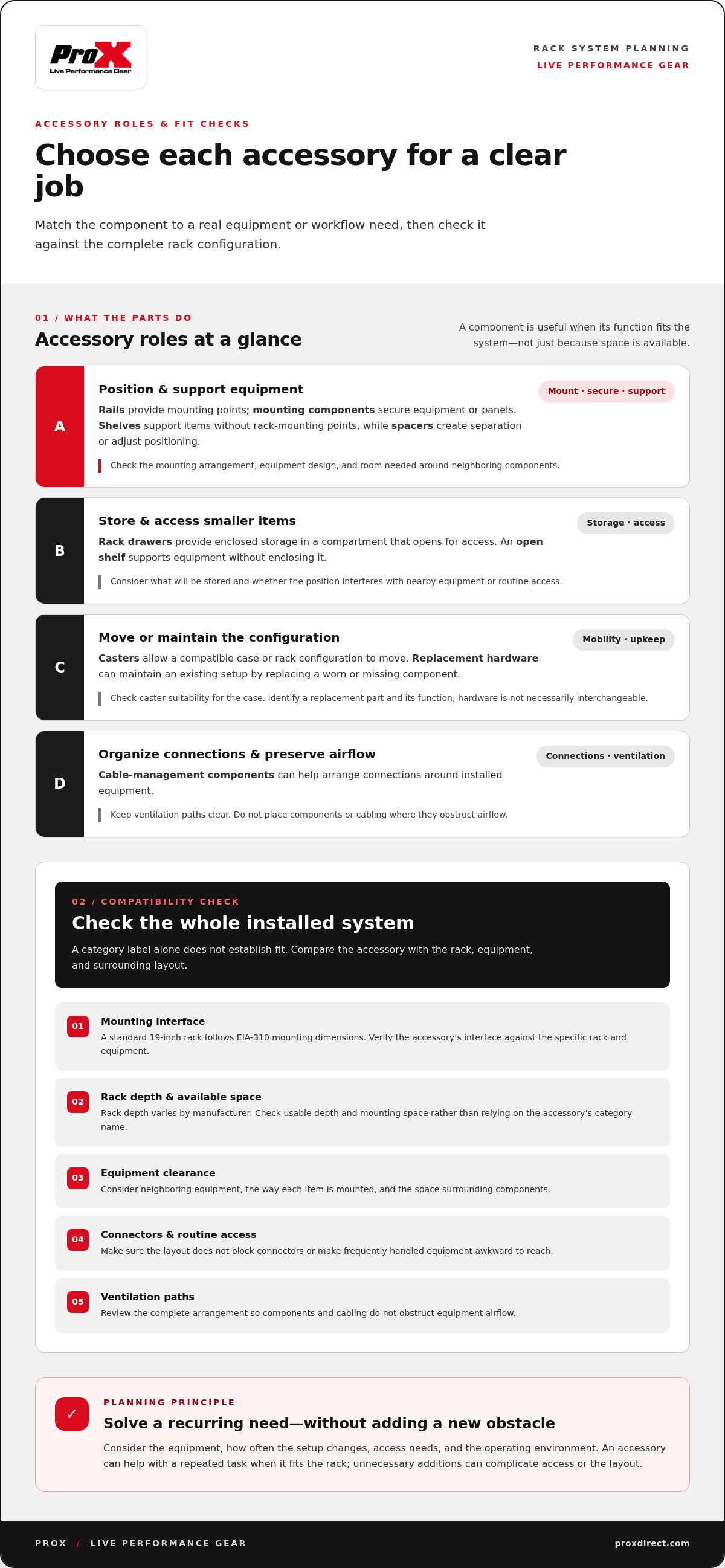
Accessory categories make more sense when grouped by task: positioning equipment, providing storage, enabling movement, or maintaining an existing configuration. The same component may be useful in one rack and unnecessary in another. Treat each type as a possible solution to a specific layout or workflow need, not a standard part of every setup.
Mounting, spacing, and equipment-support components
Rails provide mounting points for equipment designed to attach within a rack. Their position and interface determine where equipment sits, so compatibility with both the case and equipment matters. Mounting components, such as fasteners and panel mounts, secure equipment or panels. The required hardware depends on the mounting arrangement. A similar-looking part may not suit every configuration.
Shelves support equipment that does not attach directly to the rack rails, while spacers create separation between components or meet a layout requirement. These parts serve different purposes: a shelf carries an item, while a spacer adjusts positioning. Choose based on how the equipment is designed to sit and how much room surrounding components need. ProX’s rack and case categories provide a starting point for considering case types alongside their equipment systems.
Storage, access, mobility, and replacement components
Rack drawers provide enclosed storage within a rack. Unlike an open shelf, a drawer holds items in a compartment that opens for access. Consider what you plan to store and whether the drawer’s position will interfere with nearby equipment or routine access. A drawer is useful when it solves a storage problem, not simply because rack space is available.
Casters allow a compatible case or rack configuration to be moved. Their suitability depends on the case and intended use, so do not assume a caster will fit every setup. Replacement hardware serves a different purpose: it can maintain an existing case configuration by replacing a worn or missing component. Identify the part and its function before selecting a replacement. Hardware is not necessarily interchangeable.
Cooling is another consideration when planning an accessory layout. Keep the equipment’s ventilation paths clear, and do not place components or cabling where they obstruct airflow. The right approach depends on the system and its operating conditions. For an overview of enclosure accessory categories, see this guide to server enclosure accessories. Detailed thermal planning is a separate topic.
Use these categories to make a shortlist, then narrow your choices by function and fit. ProX’s catalog brings together cases and accessories for production systems, making it useful to explore components alongside the case types they support.
How to Compare Rack Case Accessories for Fit and Compatibility
A category label alone does not establish fit. Compatibility depends on the case’s dimensions and mounting interface, the accessory’s interface, and the space and equipment available in the intended configuration. Compare these factors before choosing a component. An accessory may serve the right function but still fail to fit, obstruct access, or conflict with installed equipment.
Use the case and accessory specifications as the basis for comparison. Check rack-unit capacity, mounting interface, clearance, and intended equipment separately. In a standard rack, one rack unit (U) represents 1.75 inches of vertical mounting space. This helps establish how much rack height an accessory occupies, but it does not describe depth or confirm that mounting points match. Rack depth varies, so compare the stated dimensions of both components rather than relying on the rack’s width or the accessory’s name.
Compare fit checks by accessory type
| Accessory type | Purpose | Checks before selection |
|---|---|---|
| Rails and mounting components | Position and secure compatible equipment | Compare attachment points, interface, rack-unit space, and equipment mounting requirements. |
| Shelves | Support equipment that doesn’t mount directly to the rails | Review shelf dimensions, mounting method, available depth, and space around adjacent equipment. |
| Drawers | Provide enclosed in-rack storage | Check rack-unit space, mounting points, opening clearance, and nearby cables or components. |
| Spacers | Adjust separation or positioning | Confirm the required spacing and how the spacer attaches within the existing layout. |
| Casters | Enable movement of a compatible case or rack | Compare the attachment interface and case configuration; don’t assume a caster suits every case. |
| Replacement hardware | Maintain an existing case configuration | Match the replacement to the original component and its attachment points. |
Check dimensions, interfaces, and intended use
Measure usable space, not just the rack’s exterior. Account for clearance around doors, removable panels, cable connectors, and equipment that needs access during operation. A component can fit within the rack’s stated height and still interfere with a door or make a connection difficult to reach. Check the full arrangement, including the position of neighboring equipment.
Assess each function on its own terms. Fixed mounting depends on the equipment and attachment interface. Storage depends on usable space and access. Spacing depends on the layout requirement. Mobility depends on the case configuration and how it will be moved. Replacement hardware should match the existing case component and attachment points, not merely look similar. Do not assume universal fit unless the specific product information states it.
This comparison narrows rack case accessories to components that match both the case and the task. If a stated dimension or interface differs, resolve that compatibility issue before finalizing the configuration.
A Practical Checklist for Planning a Rack Case Accessory Setup
Plan around four starting points: the equipment, the case, the operating environment, and the task each addition must support. This keeps decisions focused on practical needs instead of starting with a parts list. Work through the steps in order, resolving essential fit and access requirements before considering optional storage or mobility additions.
- Define the operating need. Describe the recurring task or issue the accessory should address. Note how often the rack is set up, whether equipment needs frequent access, and whether the system stays in one location or moves between work areas. A clear purpose helps distinguish a necessary component from a convenience.
- Identify the equipment and case. Record the case model and the equipment intended for installation. Include each item’s dimensions and mounting details from its product specifications. For an amplifier system, review the professional amplifier rack case guide for related context on assessing the case and installed equipment together.
- Document available rack space. Note usable rack-unit capacity and the positions already occupied. Keep published specifications separate from measurements you still need to take. For example, mark a published case dimension as confirmed, but flag unmeasured clearance around a connector as outstanding.
- List interface and access requirements. Record how the accessory attaches and what it must support. Account for the practical space needed to reach controls, connectors, doors, and panels. Include cable-routing needs so the planned layout does not obstruct connections or routine access.
- Separate essential requirements from preferences. Resolve mounting, equipment clearance, and access first. Then consider whether added storage, improved organization, or mobility would address a real workflow need. If the rack already performs its required tasks, an optional addition may not improve the setup.
- Compare the planned components with specifications. Review the relevant case and accessory information together. Check dimensions, attachment points, and stated compatibility for the particular configuration. Do not treat a general category name as proof that a component fits.
- Review the complete configuration. Account for installed equipment and cabling, then check that each planned component has room to operate as intended. Resolve remaining measurement gaps before finalizing the selection. Remove any addition that creates an access problem or has no defined purpose.
This process creates a practical record of what is confirmed, what still needs measurement, and why each component belongs in the system. Use it to compare ProX rack and case options with your equipment and operating needs. Keep the final configuration limited to components that serve a clear function.
Find Rack Case Accessories Through ProX’s Professional Gear Catalog
ProX Live Performance Gear designs and manufactures cases for live-event and production professionals. The company has engineered performance gear since 1984 and serves customers worldwide through a dealer network. Its catalog includes racks and case accessories, as well as replacement parts, so production teams can consider components alongside the cases they support.
How ProX’s catalog supports rack and case planning
Use the catalog to explore options in the context of your equipment system. Browse ProX cases and case categories to identify the case type relevant to your application, then consider the accessory or replacement-part category that addresses your requirement. This system-level approach keeps selection grounded in the relationship between the case, installed equipment, and intended workflow.
For amplifier setups, the professional amplifier rack case guide offers related case-planning context. Focus on the configuration at hand: the equipment to be mounted or stored, available rack space, required mounting interface, and any access or movement needs. Catalog categories help organize the search, but a category name alone does not establish product fit. Use product information for the specific case and accessory when comparing dimensions or compatibility.
This distinction matters when reviewing replacement parts. A replacement should correspond to the component and attachment points in the existing case configuration. For a new setup, compare the accessory’s intended function with the case layout before deciding whether it adds value.
What to do after identifying your accessory requirements
Carry a concise set of requirements into product selection. Note the case model, equipment dimensions, available rack space, and mounting details. Identify the task the component must support, then account for clearance around equipment, panels, connectors, and cabling. Keep specifications from product information separate from measurements that still need to be taken.
Review each option for three points: fit with the case and mounting interface, suitability for the intended function, and compatibility with how the system is operated. This applies whether you are planning fixed equipment mounting, adding storage, adjusting spacing, or replacing case hardware. Do not add a component simply because it appears in a relevant category. It should meet a defined requirement without disrupting access or the existing layout.
The complete guide to flight case engineering provides broader context for evaluating case design and equipment protection. Use that perspective alongside the specific dimensions and compatibility information for the products under consideration. Careful comparison supports a coherent rack system and keeps the final selection tied to practical requirements rather than assumptions.
Explore the ProX catalog of cases and accessories to find categories relevant to your setup and compare them with your fit, function, and workflow requirements.
Make Your Next Rack Change Deliberate
Equipment systems change as production requirements evolve. Treat each adjustment as a design decision, not an automatic reason to add hardware. Before changing the configuration, identify what has changed in the workflow and whether the existing rack can accommodate it without disrupting established use.
This approach keeps rack case accessories tied to an operational purpose over time. A brief configuration record can also help teams communicate why a component was selected and what must remain accessible. Revisit it when equipment, cabling, or setup routines change, then compare the proposed arrangement with current product information. This keeps future decisions consistent while allowing the system to adapt as its use develops.
With the next requirement defined, explore ProX’s offerings and compare relevant case and accessory categories with your system’s needs. Explore ProX rack and case accessories to find options for your setup.
Frequently Asked Questions
Are rack case accessories universal?
No. Some accessories are designed around common rack formats, but fit still depends on the case, mounting interface, available space, and intended equipment. For example, a shelf may fit the rack opening yet leave too little room for a connector or door to operate. Compare the specific case and accessory information before selecting rack case accessories. Treat compatibility as a configuration question rather than assuming parts in the same category are interchangeable.
What is the difference between a rack shelf and a rack drawer?
A rack shelf provides a platform for equipment or items that do not mount directly to the rack, while a rack drawer provides enclosed storage that opens for access. Think of a shelf as a fixed equipment-support surface and a drawer as a compartment for items you may need to retrieve. Before choosing, consider what will go inside and whether the installed layout leaves enough room to use it.
Can I add casters to any rack case?
No. A case needs a suitable attachment arrangement for casters, and the hardware must match that configuration. Before planning the change, inspect the case base and review its product information for the intended mounting points. Also consider the route and work area where the case will move. Do not assume that a caster fitting another case can be transferred to yours or that adding one is appropriate for every setup.
What is a rack panel mount used for?
A rack panel mount provides a way to install a compatible connector, control, or other panel-mounted component in a rack panel. For example, it can place a connection point at the rack face rather than leaving it loose inside the enclosure. The opening, mounting method, and component dimensions need to correspond. Check how the installed panel will sit relative to adjacent equipment and any connections behind it.
How do I identify the right replacement part for a rack case?
Start with the case model and identify the exact component that needs replacement. Note where it attaches, how it is oriented, and any identifying details on the part or case documentation. Compare those details with the replacement information rather than choosing by appearance alone. For a case used across multiple setups, keep a record of replaced components and their locations to make future identification easier.
How can I organize cables inside a rack case?
Plan cable paths around the equipment connections they serve, and label both ends so each run is easier to trace during setup or troubleshooting. Keep slack controlled without pulling on connectors, and secure cables so they do not obstruct access to controls or removable panels. Review the layout with the case closed and open, where applicable, to catch snags or blocked connections before using the system.
Disclaimer
Any trademarks, trade names or brand names appearing herein that do not belong to ProX are the property of their respective owners and/or companies, and such appearance doesn't and shall not constitute or imply endorsement, sponsorship or recommendation by ProX.


