

A case that fits every device can still leave them exposed to movement, pressure, or poorly managed accessories. Choose a road case for multiple laptops and tablets by matching its interior to devices in their protective covers, then assessing the padding, any false bottom, compartment layout, rugged construction, and loaded weight. The right configuration keeps equipment organized without adding unnecessary bulk.
Transporting a mix of laptops and tablets means balancing protection with practical handling. Padding should cushion each device, while a false bottom can separate equipment from the case floor. Accessory compartments can keep cables and power supplies from shifting against screens.
Assess these features, compare usable interior capacity with your devices, and account for the case’s weight once loaded. This gives you a clearer basis for choosing a configuration suited to your equipment and the demands of moving it between work locations.
Key Takeaways
- Plan capacity around the full device mix and the way each unit will be arranged inside the case.
- Separate power supplies and peripherals so they remain organized and don’t press against screens.
- Assess how a false bottom changes the interior layout and helps keep devices apart from the case floor.
- Match the case’s construction to the handling conditions it will encounter during transport.
- Consider loaded weight alongside protection and storage, since both affect day-to-day handling.
Accessory compartments for power supplies and peripherals
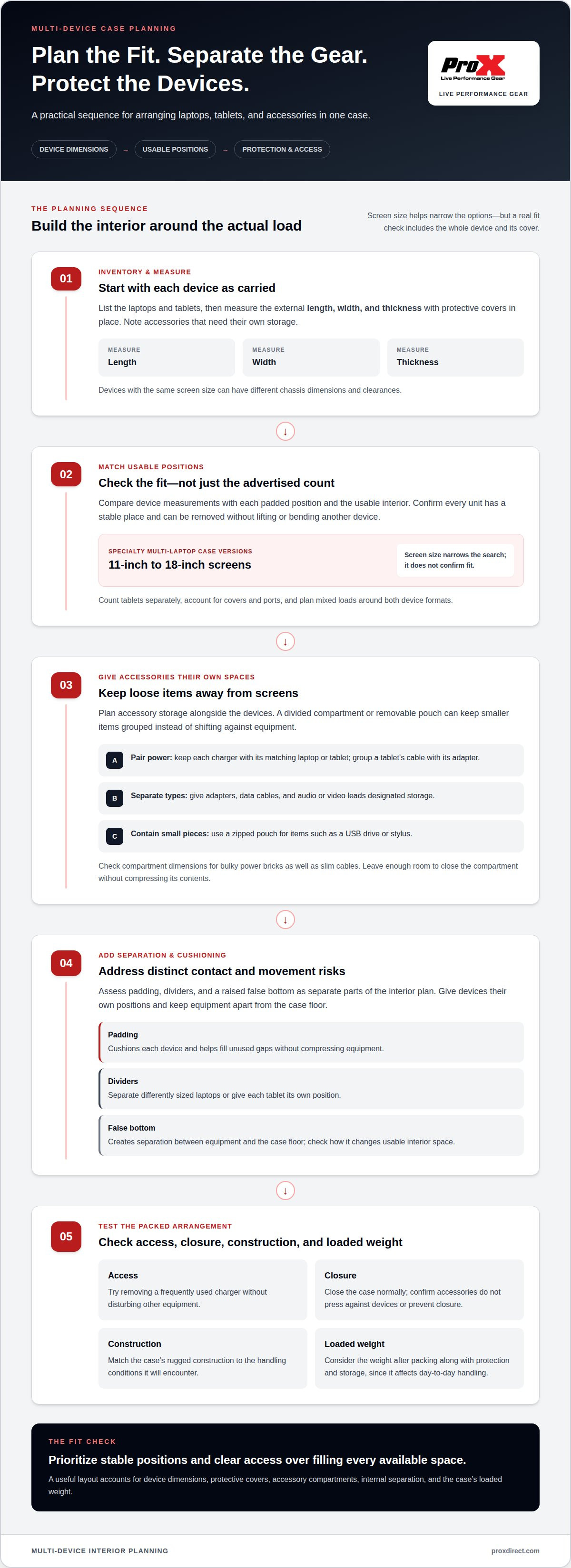
Power supplies, cables, and peripherals need designated storage, separate from device screens. A laptop charger, charging adapter, video cable, wireless mouse, and tablet stylus each have different shapes and handling needs. If these accessories share an open space, plugs can press against equipment during travel. A divided compartment or removable pouch keeps small items grouped and easy to retrieve.
Start by listing the accessories needed for a workday or production call. Match each item to its device: keep the charger with its laptop, and group the tablet’s charging cable with its adapter. This pairing helps prevent a common packing error: arriving with a device but leaving behind its power supply. Keep spare cables separate from daily-use cables.
Compartment dimensions matter as much as the number of pockets. A bulky power brick needs a different space from a slim charging cable. Check how each charger fits, including its plug and cable bend. Avoid forcing a cable into a tight fold, and leave enough room to close the compartment without compressing its contents.
- Group each charger with its matching laptop or tablet.
- Separate adapters, data cables, and audio or video leads.
- Place small items, such as a USB drive or stylus, in a zipped pouch.
- Keep loose connectors from resting against device displays.
For laptop accessories, assign each item a consistent place. For example, put the laptop’s power supply in one compartment and its mouse in a separate pocket. A tablet keyboard or protective cover may need more space than a cable. This arrangement makes items easier to identify during setup and avoids repeated unpacking between work locations.
Consider how often you need to access each item. A charger used at every stop should be reachable without removing other equipment. A spare video adapter used only for specific presentations can sit deeper in storage. Separate compartments also keep cable coils from spreading across the case interior when the lid opens.
Before travel, pack the accessories in their intended compartments and close the case normally. Confirm that the lid shuts without pressure from a power brick, mouse, or cable bundle. Then remove a frequently used item, such as a laptop charger, and return it to its assigned space. This routine shows whether the layout allows efficient access and organized storage.
A road case for multiple laptops and tablets works best when accessory capacity reflects the full equipment set, not just the devices. Account for chargers, adapters, input devices, and presentation cables alongside laptops and tablets. If the equipment mix changes between assignments, a removable organizer can group smaller accessories while leaving the main storage area available for devices.
Need to Transport Multiple Laptops Safely and Efficiently?
Capacity starts with the devices, not a case’s advertised laptop count. A single-laptop case is designed to hold one laptop per case. Specialty multiple-laptop case versions are cut for laptops from 11-inch up to 18-inch screens. Those screen ranges help narrow the search, but screen size alone doesn’t establish a fit.
Measure each laptop’s length, width, and thickness, including its protective cover. Compare those measurements with each padded position and the usable interior. A rugged field-service laptop may have a thicker housing than a slim office model, so devices with the same screen size may need different clearances. Include accessories only when the layout provides separate space for them.
What are the risks of storing or transporting multiple electronics in one road case? Devices can shift into one another, while pressure from other equipment or accessories can damage screens, corners, or connectors. A crowded interior can also make individual units harder to remove without disturbing the rest.
Plan the layout around the actual device mix. For example, a case carrying two laptops and several tablets needs positions suited to both sizes, rather than a laptop-only layout with loose space. A fitted divider can separate differently sized devices. Fill unused gaps with secure padding that prevents movement without compressing equipment.
For a multi-laptop case, assess capacity by usable positions and access. Confirm that each laptop can be inserted and removed without lifting or bending another device. Account for hinge edges, ports, handles, and attached covers. If a team uses laptops with different chassis dimensions, organize them by size and assign each position consistently.
- Record each device’s external dimensions, including its cover.
- Group laptops by chassis size and thickness.
- Count tablets separately from laptops when planning fitted positions.
- Leave room for safe removal, not just storage.
Multi-tablet capacity also depends on thickness, covers, and separation between devices. A case designed around compact tablets may not accommodate larger units with keyboard covers. Check that dividers give each tablet its own position and that accessories don’t take up space needed for a device. Mixed laptop-and-tablet loads need a layout that accommodates both formats.
Capacity means practical fit, not simply a maximum count. Review the device list, protective covers, and compartment arrangement together. For a road case carrying multiple laptops and tablets, prioritize stable positions and clear access over filling every available space. This makes the load easier to organize and reduces contact between devices during handling.
Padded protection and false-bottom designs
Choose internal protection based on each device’s dimensions, carrying position, and exposure to handling conditions. Padding, a raised false bottom, and enclosure features address different risks, so assess them separately.
Sizing Cases for Devices and Accessories
Measure every laptop and tablet with its protective cover fitted. Compare those external dimensions with the padded positions, then allow space for accessories such as a tablet keyboard. Measuring a bare device can lead to a tight fit once the cover adds thickness. The road case for multiple laptops and tablets should hold each unit securely without forcing it into place.
Padding should cushion a device and keep it from shifting. A false bottom creates clearance between the case floor and the equipment compartment; its value depends on the padding and support above it. Check that the platform sits evenly and doesn’t flex under the packed load. For a second laptop carried in a backpack, use a separate padded sleeve to cushion it.
Use this sequence to assess fit:
- Measure each device with its cover attached.
- Compare the measurements with the intended padded slot.
- Account for accessories that share the equipment compartment.
- Check that padding doesn’t obstruct ports or make removal difficult.
Protection from Water, Dust, Impact, and Theft
Impact protection depends on the case structure, interior padding, and separation between devices. Water and dust protection depend on enclosure design, including how the lid and closure meet. A locking point can restrict casual access, but it doesn’t make equipment theft-proof. Assess these as separate aspects of protection, not as a single guarantee.
For a case exposed to dust or moisture during transport, inspect the lid perimeter and closure surfaces. A gasket can help form a tighter seal when the case closes correctly, but protection depends on the complete enclosure. Don’t assume rugged construction alone provides water or dust resistance. A case used indoors has different exposure demands from one moved through a dusty venue.
False-bottom designs also need to suit the load. If heavy accessories sit beneath a raised equipment platform, confirm that the platform separates them from the devices. Keep rigid items, such as power adapters, away from screens. For mixed laptop and tablet loads, padded dividers help prevent devices from striking one another during handling.
Before transport, close the case and inspect the perimeter for trapped cables or fabric. Confirm that each latch engages and any lock can be applied without distorting the lid. For a setup sensitive to water or dust, keep the case closed in exposed areas and don’t treat a sealed appearance as proof of a specific protection level.
Verify the fit of the equipment before carrying it. For a second laptop in a backpack, use a separate padded sleeve, giving that laptop its own cushioned protection. The separate sleeve provides individual cushioning for the second laptop inside the backpack. Keep this laptop in its own padded sleeve when carrying it there, so its protection comes from the sleeve rather than relying on the case’s padded positions alone.
Rugged cases for transporting multiple laptops, tablets, and mobile devices
Compare cases by interior layout, construction, and the equipment they need to carry. A laptop-only case may not suit a mixed load of laptops, tablets, and mobile devices.
Multi-Device and Single-Laptop Case Comparison
A single-laptop case is designed to hold one laptop per case. A multi-device case can consolidate several devices, but its dividers and usable space must match the actual load. For example, a team carrying laptops, tablets, and handheld devices needs separate, accessible positions rather than one large open cavity.
Consolidation can reduce the number of cases to handle, but it also concentrates the load. A single-laptop case keeps one computer in its own enclosure, which may suit individual assignments or separate users. Compare that option with a shared case by considering device access, equipment mix, and how the packed case will be moved.
Rugged construction describes the case’s physical build, not a guarantee against every transport hazard. Inspect the shell, corners, lid, closures, and interior supports as a system. For example, a rigid exterior does little to separate a tablet from a laptop if both can shift into the same open area.
Cases for Multiple Laptops
Cases described as holding several laptops should be evaluated by their fitted positions, not capacity wording alone. Specialty multiple-laptop case versions are cut for laptops from 11-inch up to 18-inch screens. That range does not establish that every laptop within it will fit; chassis dimensions, protective covers, and slot layout still matter.
For an eight- or ten-laptop configuration, treat stated capacity as a planning prompt, not a verified fit for every device combination. Confirm that each position accommodates the actual laptop dimensions and allows removal without lifting adjacent equipment. A case intended for a uniform fleet may not suit a mixed set of slim notebooks and thicker field computers.
Assess ATA-fabricated laptop shipping cases by their physical design and intended load. The label alone doesn’t tell you how many devices fit, how the interior dividers are arranged, or whether tablets have dedicated positions. Examine the construction and layout together, then match them to the devices and accessories being transported.
For a practical comparison, list each device type, its protective cover, and its handling needs. Then assess whether a dedicated single-laptop case or a shared multi-device layout better supports access and separation. A case carrying laptops alongside tablets and phones needs assigned positions for each format, with no loose devices resting against one another.
Choose capacity for the equipment used on a typical assignment, not the largest possible load. If the device mix changes, flexible internal separation can accommodate different shapes. Evaluate a road case for multiple laptops and tablets by its fit, usable layout, and construction together, rather than by a capacity label alone.
Case weights
Case weight affects how a loaded setup is handled at each stop. Compare the empty case weight with the expected load, including laptops, tablets, chargers, cables, and dividers. The total matters more than the shell weight alone. A case that feels manageable empty can become cumbersome once its compartments are full.
Start with the case’s listed empty weight, then account for each device and accessory in the planned configuration. If the contents change between assignments, use the heaviest expected load as your handling reference. A laptop, power supply, and padded divider all add weight. Keep accessory storage focused on equipment needed for the trip.
Construction choices influence empty weight. A substantial shell, reinforced corners, metal hardware, or built-in wheels can add material to the case. Each feature should serve a transport need. For example, a case moved across a venue may benefit from rolling hardware, while one repeatedly lifted into a vehicle should be assessed for its total weight and grip points.
Consider the route between storage, vehicle, and work area. Stairs require lifting, while a long, level corridor may allow rolling. Doorways, vehicle access, and available handling assistance also affect which case format is practical. The same loaded case can present different handling demands on different routes, so evaluate its usual path rather than an idealized one.
- Compare empty case weight with the loaded setup.
- Include devices, power supplies, dividers, and other packed accessories.
- Consider whether the route involves lifting, rolling, or both.
- Remove equipment that doesn’t need to travel in the case.
Weight distribution matters as much as total weight. Place equipment in its intended positions, then assess whether the load sits evenly when the case is carried or rolled. A dense charger compartment at one end can make handling less balanced. Store accessories in assigned spaces and avoid filling unused areas with unnecessary items.
For a team transporting several laptops and tablets, compare the weight of one consolidated case with separate cases for different users or assignments. Consolidation can reduce the number of cases to manage, but it concentrates the full equipment load in one enclosure. Separate cases divide the load, while requiring more items to be handled and tracked.
Choose the lightest configuration that still provides the structure and organization the equipment requires. Evaluate the empty case, packed contents, and transport route together. Explore protective case options to compare configurations for your equipment and handling needs.
Racks & Case Accessories
Racks & Case Accessories and Utility/Storage Cases can help organize equipment and support transport needs. If your laptop and tablet setup includes additional components, consider how case storage can keep them grouped with the devices. Other case options are also available.
When selecting a case configuration for a defined mix of devices and accessories, share the equipment types and how they’re transported, then consider which case category best suits the load. Ask about case options.
Build a Consistent Equipment Transport Standard
Use this decision to establish a repeatable way to assign cases to equipment. A concise inventory record can identify which devices travel together, which accessories belong with them, and how the setup changes between assignments. The record gives production and technical teams a shared reference when equipment is replaced, added, or reassigned.
For each configuration, document the intended device group and its handling needs. Keep the record current as laptops, tablets, and supporting equipment change. This makes future case decisions more consistent and helps teams avoid relying on memory when preparing a deployment. A road case for multiple laptops and tablets should support the equipment plan the team actually uses, not an outdated loadout.
The company offers case options for varied equipment transport needs. Contact the company to discuss which configuration fits your equipment plan. Contact the company about your case needs, and take the next step toward a more consistent transport setup.
Disclaimer
Any trademarks, trade names or brand names appearing herein that do not belong to ProX are the property of their respective owners and/or companies, and such appearance doesn't and shall not constitute or imply endorsement, sponsorship or recommendation by ProX.


