

A case can protect equipment yet make every lift, opening, and setup awkward. Ergonomic considerations for case design focus on how people handle, move, access, and use a case, not just on its protective shell.
Good ergonomic design accounts for the user, the task, and the work environment. Handle position, case weight, interior layout, and clearance around an open lid all affect how practical a case is to transport and access. Protection and usability need to be considered together.
This article explains how human-centered design principles guide case features, how material choice affects weight and structural performance, and why movement clearances matter in use. It also covers how standards inform ergonomic thinking: ISO 9241 addresses ergonomics of human-system interaction, according to the International Organization for Standardization. The result is a practical framework for evaluating case design against real handling demands, from carrying and rolling to opening, storing, and working around equipment.
Key Takeaways
- Use ergonomic standards as design inputs, then assess how the case supports the people handling it and the tasks they perform.
- Match case material and interior arrangement to the equipment’s dimensions, weight, and delicacy.
- Choose handling features around how the case moves: carrying, rolling, opening, and access during setup each place different demands on its design.
- Plan clearance around the case in use, including space for lids, equipment access, and safe movement through the work area.
- Apply inclusive design principles so case access and handling suit varied users and working conditions.
Ergonomic standards and guidelines
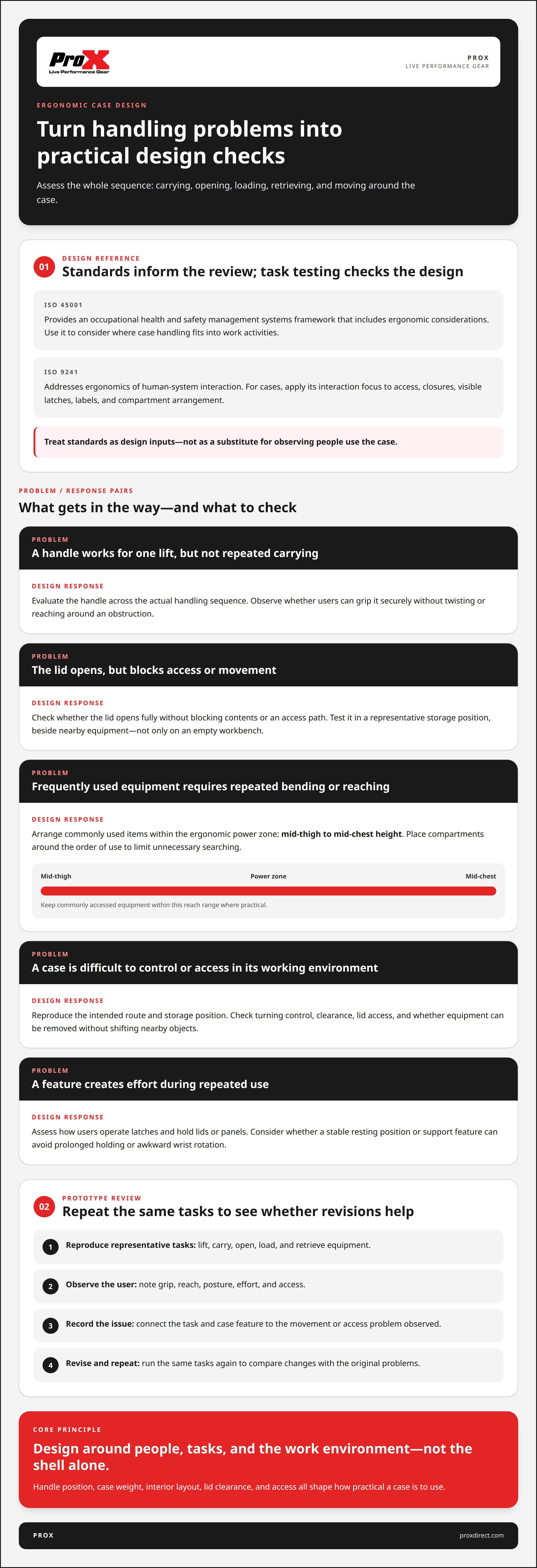
Ergonomic standards give design teams a framework for assessing how people interact with equipment and work systems. For case design, that means looking beyond the shell: carrying, opening, loading, and retrieving equipment are separate tasks. A handle that works for a short lift may be poorly positioned for repeated carrying. Assess each feature across the actual handling sequence.
ISO 45001 provides an occupational health and safety management systems framework that includes ergonomic considerations, according to the International Organization for Standardization. Its relevance is at the management-system level: it places ergonomics within a broader approach to occupational health and safety. A design review can use that context to examine where case handling fits into work activities, such as moving equipment between a storage area and a setup location.
Standards are most useful when translated into specific design questions, not treated as a substitute for testing. For a hinged-lid case, assess whether the lid opens fully without blocking access to the contents. For a case lifted from floor level, observe whether users can grip the handles without twisting or reaching around an obstruction. These checks turn ergonomic goals into features the design team can evaluate.
Evaluate prototypes by reproducing representative tasks with users who reflect the intended handling conditions. Ask them to lift, carry, open, load, and retrieve equipment, then observe their grip, reach, posture, effort, and access. Note where a handle feels awkward or a lid interferes with movement. Revise the prototype based on this feedback, then repeat the same tasks to compare changes against the problems observed.
Test the case in its intended environment, too. A prototype that opens easily on an empty workbench may be difficult to use beside other stored equipment. Place it in a representative storage position and check whether someone can open the lid and remove the intended item without moving nearby objects. This can reveal clearance and access problems a tabletop demonstration misses.
Document observations to make an ergonomic review actionable. Record the task, the case feature involved, the user’s movement, and the resulting design issue. If several users reach across the case to access the same compartment, reconsider the layout. If a loaded case is difficult to control while turning, examine handle position and the movement path. Each revision should address an observed task, not an assumption.
Use standards as a consistent reference point throughout concept review, prototype testing, and design revision. ISO 45001 situates ergonomic considerations within occupational health and safety management; task-based testing then shows how specific case features perform in use. Together, these approaches help teams identify handling demands early and connect design decisions to actual work activities.
Ergonomics and human-centered product design
Human-centered design starts with the people using a case and the tasks they perform. A case is handled during transport, setup, access, and storage, so its features should support the whole sequence. A recessed handle may protect the exterior, for example, but its depth and position still need to allow a secure grip. Design the case to suit the task, rather than making users compensate for inconvenient geometry.
ISO 9241 covers ergonomics of human-system interaction, including usability, visual ergonomics, and input devices, according to the International Organization for Standardization. Although a case is not a screen-based system, the standard’s focus on interaction is relevant: users need to understand how to access contents and operate closures. Clear labels, visible latches, and compartments arranged around the order of use can reduce unnecessary searching during setup.
Handling features should reflect how users apply force. A well-positioned handhold can make lifting more controlled, while wheels can reduce the effort needed to move a heavy case. A telescopic handle may suit movement across a venue, but it does not replace a practical grip for lifting the case into storage. Assess every feature in context, including the route, access height, and frequency of handling.
Posture matters during repeated tasks. Keeping frequently accessed items within easy reach can reduce repeated bending and reaching across a case. The ergonomic power zone extends between mid-thigh and mid-chest height. Placing commonly used equipment within that range can support a more neutral working posture. This can be especially useful for a case that also serves as a workstation, where equipment is accessed repeatedly during production.
Human-centered design also accounts for static load. Holding a lid, panel, or piece of equipment in position for an extended period can cause fatigue. A support feature or stable resting position can reduce the need to hold it. Similarly, a latch that requires awkward wrist rotation can complicate repeated access, even when it closes securely. Ease of operation is part of usability, alongside structural protection.
Inclusive design considers differences in reach, grip, strength, and mobility. A single handle position may not suit every user or task, so handle placement and access paths deserve attention during concept development. For example, an access panel that opens into a narrow aisle can block movement, even if the interior layout is efficient. Protective case options can be considered in relation to the equipment, handling method, and access requirements. The goal is a case that works as part of the user’s process, rather than adding avoidable effort.
Case materials and their weight and strength
Material selection connects equipment protection requirements with the effort needed to handle the case. The equipment’s dimensions, weight, and fragility influence both shell material and interior arrangement.
Material Weight and Strength
Material weight and strength describe how a shell balances mass with resistance to impact and structural stress. This balance matters because a protective case still has to be lifted, carried, or moved through its working environment. Polypropylene is lightweight, tough, and impact-resistant, making it useful when reducing shell weight matters. ABS is more rigid and has strong structural integrity, while aluminum combines low weight with strength and corrosion resistance.
The equipment helps determine which material properties matter most. A delicate device may need an interior layout that limits movement and manages shock, while a large, heavy item places greater demands on the shell and its supporting structure. Polypropylene is used in injection-molded cases for military, medical, and industrial applications. ABS is frequently used for tool cases and protective enclosures. Aluminum is used in aerospace, industrial, and high-end storage cases. These examples show why material choice depends on the application, not a universal ranking.
Surface contact matters, too. A molded texture can feel more secure to grip than a smooth surface, especially where hands contact the case during lifting. Rounded edges at hand-contact points can reduce pressure from sharp corners. Evaluate texture and edge geometry alongside shell stiffness: a comfortable grip cannot compensate for a case poorly matched to its load.
Design Choices and Production Tradeoffs
Production tradeoffs are the effects that material, geometry, and construction choices have on manufacturing effort and service life. Complex features may require additional tooling, assembly, or inspection, while simpler designs can reduce those demands. Integrate ergonomic details such as recessed grips, shaped corners, or reinforced handle areas with the shell structure, rather than adding them without regard for strength.
Manufacturing cost depends on factors such as material processing, part count, tooling, and assembly requirements. A molded shell can consolidate forms into one component, while a design with separate fittings may require more assembly steps. No material is automatically the least costly choice for every case. Dimensions, load, access needs, and production method all affect the comparison.
Durability also depends on how design features withstand repeated use. Reinforcing high-stress areas can help manage loads around handles and closures, while avoiding unnecessary features can simplify construction. A textured surface may conceal routine scuffs, but it does not replace adequate shell strength. The right design aligns material and construction with equipment weight, expected handling, and working conditions.
Clearance and freedom of movement
Clearance determines whether a case can be opened, operated, and moved without obstructing people or equipment. A workbench case may prioritize access over portability, while a case used in a narrow aisle needs a compact movement path.
Placement of Controls and Access Points
Control placement means arranging handles, ports, latches, and operating points for clear access. A control can be within reach yet difficult to use if a lid, cable, or nearby case blocks it.
Place handles where users can grasp them without reaching over protruding controls. Position ports so connected cables can bend and exit without being pinched by a closed lid or pressed against a wall. For example, a side-facing connection may work better than a rear-facing one when a case sits close to another surface. Keep frequently used controls visible and accessible once the case is in position.
Opening clearance is part of access design. A lid that swings into a walkway can obstruct movement, even if its hinges work smoothly. A removable panel or an opening direction that faces the operator may suit a confined work area. The right arrangement depends on where the case sits and which controls users need during operation.
Designing for Different Users
Designing for different users means accounting for differences in hand size, reach, strength, and physical ability. A grip or latch that works for one operator may require excessive reach or force from another.
Provide handholds that allow more than a fingertip grip, and keep them clear of equipment and sharp projections. A latch should be visible and reachable from a stable stance, without requiring users to lean over the case. For a case opened at floor level, an accessible pull point can reduce awkward reaching when releasing it.
Access paths should also let users approach from a practical direction. A case placed against a wall may restrict access to one side, so controls and handles should suit the available approach. Inclusive design considers both the person and the workspace: a well-positioned handle cannot solve a blocked route or obstructed opening.
Reducing Common Ergonomic Problems
Common ergonomic problems include blocked controls, awkward reaches, pinched cables, obstructed lids, and difficult-to-grip handles. Addressing them matters because each obstruction adds effort to routine setup or equipment access.
Review the case in its actual working position. Open the lid beside adjacent equipment, connect representative cables, and check that the operator can reach the controls without twisting around the enclosure. If a workbench case stays in storage, prioritize direct access to its contents over portability features that interfere with nearby objects.
Moving a case repeatedly through a cramped passage can cause collisions and handling problems. A narrower profile, relocated handles, or a different opening direction may improve movement, depending on the equipment and surrounding layout. The objective is to preserve access while leaving enough room for people to move and work without avoidable obstruction.
What ergonomic principles should guide case design?
Effective case design treats the enclosure, its contents, the operator, and the work area as one system. ISO 6385 provides guidelines on ergonomics principles for designing products, services, and systems. For ergonomic considerations for case design, this means assessing how the case supports real tasks while preserving access, stability, and freedom of movement.
Start with the work sequence. A case used for frequent setup has different demands from one stored between occasional uses. Map how equipment is packed, accessed, connected, and returned, then identify steps that cause unnecessary effort. For example, placing frequently used items behind equipment that must first be removed adds handling and interrupts the task. Organizing contents in order of use can reduce that friction.
Design for neutral, balanced movement rather than awkward postures. Operators should be able to reach required items without leaning across a wide case or twisting around an obstruction. The ergonomic power zone, between mid-thigh and mid-chest height, can help guide where commonly handled items sit during use. A case intended for a workbench may therefore prioritize stable access over portability.
Allow space for people and equipment to move. A case that opens into a walkway can create a collision point, while protruding handles may catch on nearby objects. Consider the full operating footprint, including the lid, connected cables, and space needed to remove equipment. For example, a case beside a wall needs an opening direction that leaves the user a clear approach and room to reach its contents.
Inclusive design accounts for users with different reach, grip, strength, and mobility. A single operating position can exclude people when controls are hard to reach or access requires a narrow approach. Review the same task from different working positions, including seated access where relevant. Clear labels and distinct controls can also help users identify the correct access point without repeated trial and error.
Balance protection and usability across the entire case system. A secure closure has limited value if it is difficult to operate during routine access, and an organized interior is ineffective if items cannot be removed without shifting other equipment. Evaluate the complete case with its intended contents, placement, and task sequence. This reveals conflicts between features that isolated component reviews can miss, an important part of ergonomic considerations for case design.
Use these principles as design criteria, then assess the case in its intended environment. Check whether a person can approach, open, access, and move around it without obstruction. For a case used as a work surface, examine stability and reach; for stored equipment, prioritize direct access and clear movement paths. Applying ergonomic considerations for case design to these use conditions helps guide practical choices. Explore case options for your equipment with these requirements in mind.
Racks & Case Accessories
Racks and case accessories support production setups where equipment protection and organized storage are part of the handling plan. Consider these products when case placement, access, and movement need to work together across a work area.
For broader equipment needs, teams can also consider cases for equipment, truck-pack cases, and utility/storage cases. Production teams can consider these categories based on the equipment being housed and how it is stored or moved. The ergonomic principles in this article can help clarify priorities such as access, grip, clearance, and material balance before choosing a case type.
Share your equipment and handling requirements with a case supplier to discuss relevant case options.
Define the Requirements for Your Next Case
Turn ergonomic priorities into a design brief that reflects the equipment’s working environment. Record the equipment dimensions, access sequence, storage location, movement route, and the people who will handle it. These details provide practical reference points for design discussions and help distinguish essential features from preferences. Ergonomic considerations for case design are most useful when tied to actual tasks and operating conditions.
Case manufacturers offer cases for equipment transport, truck packing, utility, and storage needs. Let the intended application guide the category. Define how the case will be accessed and moved, then use those requirements to shape the next design decision.
Discuss case design with a case manufacturer and bring your equipment and handling requirements into the conversation. A clear brief is a practical starting point for a case that works within your production setup.
Frequently Asked Questions
What is Ergonomics?
Ergonomics is the study and application of how people interact with products, tasks, and work environments. Its purpose in product design is to make operation usable and compatible with human capabilities. For example, a case’s usability involves more than opening its lid: users must identify the correct compartment, access the intended equipment, and return it without disrupting other contents. The focus is the complete interaction, not one feature in isolation.
How do case dimensions and shape affect grip comfort and accessibility?
Dimensions and shape determine where users can grasp a case, how far they need to reach, and whether its contents remain accessible in the intended location. A broad enclosure may be hard to hold close to the body, while a deep compartment can make smaller items difficult to retrieve. Assess the case with equipment loaded and nearby surfaces in place. This reveals whether handles, openings, and access points remain usable in the actual setup.
What are recommended weight and balance considerations for handheld cases?
Set the weight and balance of a handheld case according to its equipment load, carrying method, grip location, and movement route. Contents concentrated at one end can pull unevenly against the hand, even if the overall load is manageable. Positioning equipment to center the load around the carrying grip can support controlled handling. Also consider whether the case is carried briefly between stations or moved repeatedly across a work area.
What standards or accessibility guidelines apply to ergonomic product and case design?
ISO 6385 provides ergonomic principles for designing products, services, and systems. ISO 9241 covers human-system interaction, including usability, visual ergonomics, and input devices, according to the International Organization for Standardization. ISO 45001 provides an occupational health and safety management systems framework that includes ergonomic considerations, also according to the International Organization for Standardization. For case design, these references inform usability and work-system review; accessible design should also account for varied users and abilities.
Disclaimer
Any trademarks, trade names or brand names appearing herein that do not belong to ProX are the property of their respective owners and/or companies, and such appearance doesn't and shall not constitute or imply endorsement, sponsorship or recommendation by ProX.


