

In desert conditions, a case’s closure and fit matter as much as its shell. Choosing dust proof cases for desert environments means assessing equipment fit, secure closures, interior protection, and how the case will handle repeated exposure to dust, sand, sun, and heat.
Fine particles can enter through gaps and seams, abrading surfaces or collecting around controls and connectors. A case should limit entry without pressing on the equipment, and its interior should help prevent contact damage during handling. Assess the exterior for the conditions it will face in storage and transport, rather than relying on unsupported protection claims.
This guide explains how to assess case dimensions, closures, interior protection, and exterior construction for desert use. It also covers cleaning and storage practices to help match protection to your equipment and its working conditions.
Key Takeaways
- Match the case interior to the equipment’s dimensions so it stays secure without pressure on controls, connectors, or other vulnerable points.
- Assess closures and attachment points as potential dust-entry paths, then choose a design that keeps seams and openings protected during use.
- Use interior lining to limit abrasion, and remove accumulated dust from both the equipment and case before storage.
- Consider how sun, heat, wind, and moisture affect the case exterior and the equipment it protects.
- Pay particular attention to ports, speakers, and buttons, where fine particles can collect and interfere with device operation.
Fit, attachment points, lining, and cleaning guidance
Start with the equipment’s full external dimensions, including handles, knobs, cables, and protruding connectors. A case that fits the main body but presses on a control can put it under pressure when closed. Too much clearance, on the other hand, lets equipment shift and rub against the interior. For example, measure a mixer with its controls in place, then compare those measurements with the usable interior space. The fit should hold the equipment without forcing the lid or loading vulnerable parts. When choosing dust proof cases for desert environments, include every protrusion in your fit assessment.
Treat every opening as a possible path for airborne grit. Check how the lid, seams, cable ports, and hardware cutouts align when the case is closed. Handles, hinges, latches, and mounting hardware also need attention because they move repeatedly during outdoor handling. Look for components that sit firmly against the case without visible gaps. A close-fitting closure can limit direct entry, but it cannot make up for damaged seals or misaligned panels.
Interior lining separates equipment from the case walls and helps reduce abrasion if items move. Choose lining that supports the device without covering ventilation openings or pressing on switches. A console needs clearance around knobs and connectors; a sensitive instrument needs stable support to prevent shifting. Accessible or removable lining also makes dust inspections easier. After use, check the interior, particularly corners and the areas beneath equipment where particles can collect.
- Measure the equipment, including protrusions, before selecting the interior size.
- Close the case and inspect seams, cable openings, and lid alignment.
- Secure loose cables separately so they don’t drag grit across controls.
- Place small accessories in enclosed pouches rather than loose beside equipment.
Cover belongings before placing them in a dusty vehicle or storage area. Use an enclosed case for equipment, and keep smaller items such as adapters inside a closed pouch. Avoid putting dusty cloths or loose packing material against clean lining; particles can transfer during handling. A range of protective equipment cases provides formats for different gear categories, but the interior fit and closure still need to match the item.
Clean in a sequence that moves dust away from equipment, not into openings. Set the case on a stable surface and remove accessories. Carefully lift out the equipment, keeping dusty surfaces away from clean lining. Wipe the interior with a clean, dry cloth, working from the corners toward the opening. Check seams, hinges, and latch recesses for trapped particles. Clean equipment according to its care instructions, and never push grit toward ports, switches, or ventilation slots. This routine helps maintain dust proof cases for desert environments.
Before storage, let cleaned items dry completely and return them only to a clean case. After each dusty outing, inspect the lining and closure, reposition displaced padding, and remove visible grit before it can abrade surfaces. When practical, store the closed case off the ground. These steps limit contamination between uses and make the next inspection more effective.
Case durability in demanding environments
Desert exposure tests more than a case’s outer shell. Dust, heat, ultraviolet radiation, and repeated handling can all stress materials, joints, and closures.
Dust Rating Differences
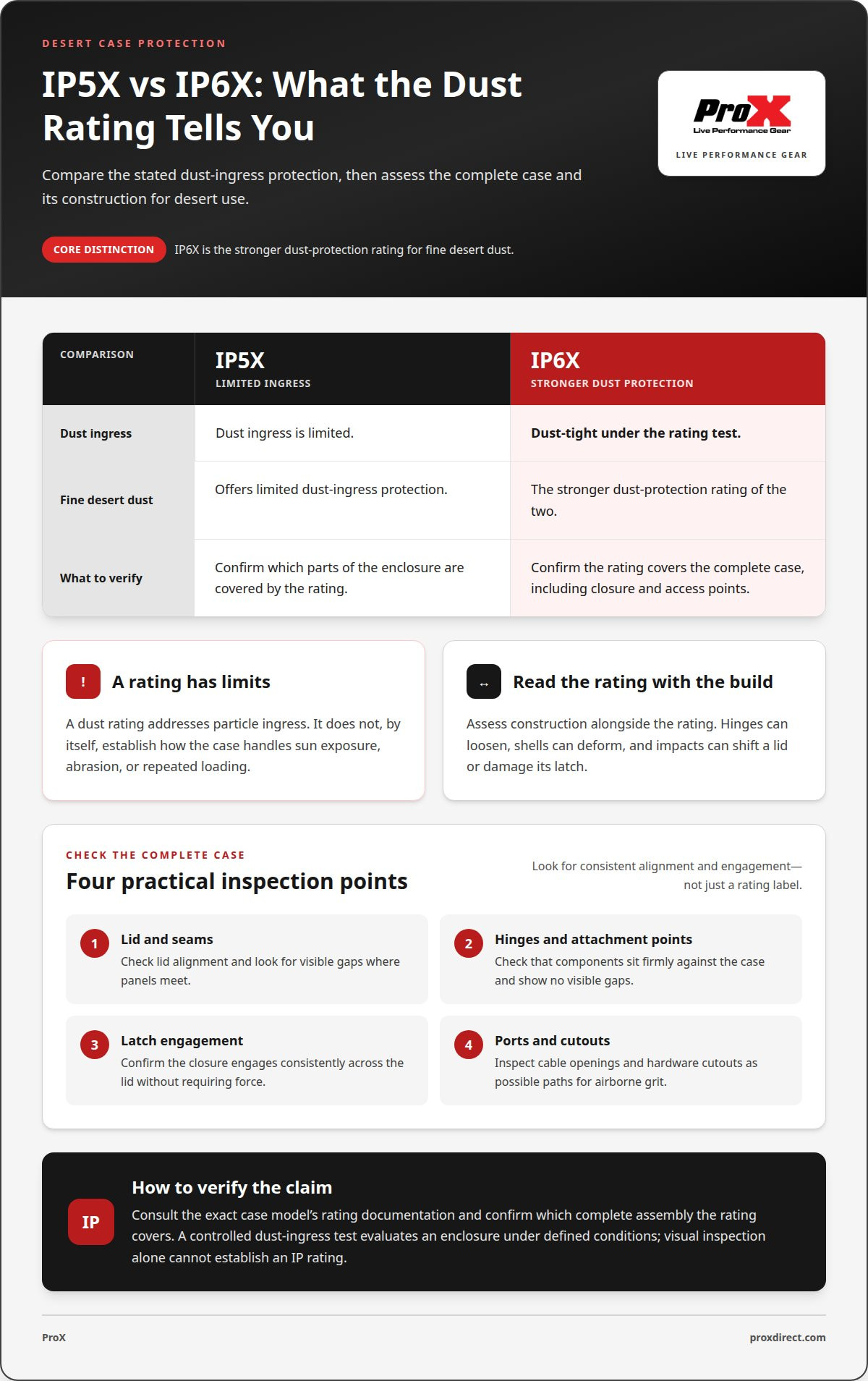
IP5X means dust ingress is limited, while IP6X indicates a dust-tight enclosure under the rating test. For fine desert dust, IP6X is the stronger dust-protection rating. Check that the rating applies to the complete case, including its closure and access points, rather than to one component or material alone.
A rating addresses particle ingress, not every kind of desert wear. Materials and construction still determine how a case handles sun exposure, abrasion, and repeated loading. For example, a dust-rated enclosure may not suit rough handling if its hinges loosen or its shell deforms. Assess any rating alongside the case’s construction and intended use.
Closures are working mechanical parts, not minor details. Repeated opening can wear contact surfaces, while impacts can shift a lid or damage its latch. Assess durability by checking hinge attachment, latch engagement, and panel alignment. The closure should engage consistently across the lid without requiring force that could distort the case.
Desert sun and heat can degrade exposed materials over time. Ultraviolet radiation can fade colors and weaken materials, while high temperatures can affect plastics and electronics. Assess whether the case’s exterior construction suits its exposure and storage conditions. A material’s appearance alone does not establish resistance to prolonged sun or heat.
Wind-driven sand can abrade surfaces and moving parts. After handling in exposed locations, check corners, edges, handles, and hardware for wear. A case that is repeatedly set down on rough ground needs durable contact surfaces. For stored belongings, heavy-duty plastic bins with tight lids are preferable to cardboard in dusty environments.
Dustproof Testing
To assess dust protection, consult the exact case model’s rating documentation and confirm which complete assembly the rating covers. A controlled dust-ingress test evaluates an enclosure under defined conditions; visual inspection alone cannot establish an IP rating. After use, check the interior for particles, particularly near closures, ports, and seams.
Do not introduce loose desert dust into a case containing equipment. Instead, assess an empty enclosure in a controlled setting and inspect its interior afterward. Record any particles and where they appear. This may reveal a closure or joint that needs attention, but only a formal test supports a rating claim.
Storage conditions also affect a case’s service life. When practical, keep cases away from prolonged direct sun and avoid locations where standing water can reach seams or hardware. Check the exterior and closure after demanding use. Cracks, loose fittings, or a lid that no longer sits evenly can compromise protection, even if the case was initially specified for dust exposure.
Desert dust accumulation and interior damage
Fine desert dust settles on equipment, vehicle interiors, and storage surfaces. Red dust and sand can enter enclosed spaces, then collect around fabrics, machinery, and sensitive components. Particles trapped between a device and its case interior can abrade surfaces as the device moves. With dust proof cases for desert environments, both the interior and handling routine matter. A clean exterior alone does not show whether grit has reached the equipment inside.
In vehicles, dust can enter through vents and windows, settling on dashboards, seats, carpets, and upholstery. Loading equipment from a dusty seat can transfer particles to it. Over time, grit can accelerate wear on fabric, carpet, and leather. Keep clean cases separate from dusty areas of the cabin. Avoid placing them directly on contaminated seats or floor mats, especially when loading several items in succession.
Dust buildup can affect electronic devices in several ways. A smartphone may overheat, develop an unresponsive touchscreen, produce distorted audio, or fail completely. Particles around equipment controls can also interfere with routine operation. For example, gear handled in a dusty production area may carry grit on its exterior even when the case appears clean.
Use a transfer-control routine when moving gear between exposed and clean areas:
- Keep clean equipment inside its closed case until the work area is prepared.
- Separate dusty items from clean cases, cables, and accessories.
- Inspect exposed equipment after use, including seams and recessed surfaces.
- Remove visible dust before returning equipment to clean storage.
Soft materials hold particles differently from hard surfaces. Dust embedded in upholstery or fabric can transfer whenever equipment touches it. A removable cover separates equipment from dusty seats, shelves, or work surfaces. After exposure, shake covers outdoors and clean them away from open equipment so released particles do not settle on controls.
Storage can compound contamination. Dust left on equipment may be pressed into surfaces when items are stacked or packed closely. Clean belongings before long-term storage, then keep them off the floor on shelving or pallets. In Southern Utah, July-September is monsoon season, when humidity spikes can occur. Raising stored items also helps reduce exposure to potential water damage.
Track recurring contamination points to identify where barriers can help most. Note whether particles appear near a vehicle vent, loading surface, or storage shelf. Dust repeatedly found on a case exterior after transport suggests a different exposure route from particles found inside stored equipment. Dust proof cases for desert environments can limit direct particle exposure, while separation and inspection help address contamination during handling.
Fine red dust and sand can infiltrate enclosed spaces and damage fabrics, machinery, and sensitive equipment. Seals alone cannot guarantee protection from intrusion.
Exterior-cover exposure to desert sun, dust, wind, heat, and rain
Exterior materials face several exposures at once: airborne grit, direct sun, wind-driven particles, heat, and occasional rain. For an outdoor-stored case, assess the shell, seams, hardware, and finish as a complete assembly. A protective cover can reduce direct contact with dust, but movement can trap particles between the cover and the surface beneath it.
For fabric covers, durable, water-resistant options include canvas, ballistic nylon, eco-leather, and high-quality polyester. A tight weave or special coating can help block fine dust, while mesh and loose-weave fabric can let particles through. Check how the cover closes around edges and openings, since uncovered seams create entry paths. A close fit also reduces wind-driven flapping that can move grit across painted or finished surfaces.
Sun exposure requires separate attention. Intense ultraviolet radiation can fade color and degrade materials, so assess UV-resistance claims for the exact exterior-cover model. A general material description doesn’t establish performance for every construction or finish. In Cedar City, summer temperatures often exceed 95°F. Under such heat, plastics can warp, electronics can be damaged, and wood can crack in storage conditions.
Heat can also change the pressure inside an enclosed case. A pressure-equalization valve can relieve pressure differences as temperatures change, but it creates an opening that must be designed to limit particle entry. Dustproof cases do not automatically need such a valve. The decision depends on the enclosure design, temperature changes, and how the equipment will be stored or moved.
Wind and rain create different demands. Wind can push sand against exposed seams, while rain can wet fabric and collect around low points. Water-resistant material can limit wetting, but does not establish that a case is waterproof. When practical, orient closures away from direct runoff, and inspect the exterior after rain for pooled water, damp seams, or grit lodged beside hardware.
Use this inspection sequence after outdoor exposure:
- Look for scuffs, worn coatings, loose hardware, and damaged seam areas.
- Check that fabric remains tightly woven and closures sit flat.
- Remove dry grit before folding or moving a cover, so particles don’t abrade its surface.
- Let damp fabric dry before storage, and keep wet material away from equipment.
Before fitting a car cover over paint—such as the vehicle protection shields available at inthegarage.com—always check the contact surface. Dust trapped between the cover and paint can create a risk of contact damage if wind moves the cover. For equipment cases, the same concern applies to grit trapped between the shell and an exterior cover. First remove loose particles, then secure the cover so it stays in place without rubbing against exposed surfaces.
Dust entering charging ports, speakers, and buttons
Charging ports, speaker openings, and gaps around buttons can let fine particles reach device interiors. A phone carried uncovered in a dusty vehicle can collect grit around its connector and controls. Particles may obstruct charging connections, interfere with buttons, or affect speaker output. A case should shield these openings during storage and transport without pressing against them.
Check the fit at each access point. A loose pocket can let a device slide until its ports touch dust on the lining. A tight pocket can press side buttons or cover a microphone opening. Check the device’s orientation inside the case and confirm that the closure does not press its controls. For equipment with multiple connectors, remove cables or route them without leaving openings exposed.
Protect openings before dusty work begins. Close built-in port covers, where provided, and place small devices in a clean, enclosed compartment. Keep loose adapters and cables separate from the device because grit on a connector can transfer into a port. For speakers and audio equipment, prevent dusty packing material from directly contacting the grille and control panel.
After exposure, inspect equipment before reconnecting or powering it. Use this sequence:
- Move the device to a clean work surface before opening its case.
- Look for visible particles around connectors, speaker openings, and buttons.
- Remove loose dust from the exterior without pushing it into an opening.
- Follow the device manufacturer’s cleaning instructions for any remaining debris.
- Inspect the case lining and compartment before returning the device.
Do not probe a charging port with a sharp object or force a connector into place. Visible debris or unusual resistance calls for careful cleaning, not added pressure. Also avoid shaking a dusty device over an open case: dislodged particles can settle into the lining and transfer back later. Keep cleaning tools and cloths clean between devices.
Dust exposure can affect more than connectivity. As dust accumulates, a smartphone may overheat, develop an unresponsive touchscreen, produce distorted audio, or fail completely. If a device behaves differently after exposure, stop repeatedly charging it or pressing its buttons until its openings have been inspected and cleaned according to its care instructions.
For production audio equipment, case selection should account for exposed grilles, connectors, and control surfaces, not just the outer dimensions. A speaker’s grille and rear connection panel need clearance from abrasive contact during storage. Review AV broadcasting case options for equipment protection formats suited to production gear.
Pay attention not only to the openings themselves, but also to the surroundings where equipment is stored. Desert dust can enter car interiors through vents and windows, settling on surfaces and fabrics. When carrying a device in a vehicle, keep its case closed and avoid placing it on a dusty seat or fabric surface. Seat covers with zippers, hook-and-loop closures, or elastic hems can limit dust entering around seat edges. Keep the cover fitted and the device enclosed until you can handle it in a clean area.
Racks & Case Accessories
Racks & Case Accessories support organized equipment storage and protection when desert use calls for a suitable case configuration. For production gear, the right format depends on equipment dimensions, access points, and handling requirements. Protective cases and utility/storage cases address different storage needs, while truck pack cases are designed for equipment packed for vehicle transport.
Consider the equipment and workflow when a standard storage format does not fit. Choose a case category based on what needs protection, how it will be packed, and which accessories support organization. Several case formats are available for professional equipment, recognizing that different uses call for different configurations.
Contact us to discuss a case or accessory option for your equipment.
Plan the Next Case Around Its Operating Conditions
Turn the conditions your equipment faces into clear case requirements. Identify whether it will be stored outdoors, moved through dusty work areas, or kept inside a vehicle. Then consider which components are most exposed and how often the equipment needs access. This practical profile helps narrow the choice among dust proof cases for desert environments without relying on broad labels alone.
Keep that profile with the equipment details when assessing a case configuration. Include dimensions, protruding controls, connector locations, and accessories that travel with the equipment. A case for one device may need a different interior layout from one carrying several components. Clear requirements make it easier to focus on construction and organization that suit your workflow.
For a case discussion based on your equipment and its operating conditions, contact us about case options. A well-defined use case gives the conversation a practical starting point and helps you move toward a suitable protection plan.
Frequently Asked Questions
How should you clean and maintain case seals after desert use?
Remove grit from the seal channel and mating surfaces with a clean, soft, dry cloth. Wipe the full perimeter, including corners and latch contact points, where particles can prevent the case from closing evenly. Avoid scraping the seal or using cleaners not approved by the case manufacturer. After cleaning, check for cuts, flattening, or separation, then close the empty case and make sure the lid sits evenly.
What case features protect gear from extreme desert heat?
Choose a case constructed for its expected temperature exposure, and consider a thermal barrier if heat-sensitive equipment requires one. Keep the case out of direct sun whenever practical; a shaded vehicle or storage location reduces direct solar exposure. Avoid placing heat-sensitive electronics against an exterior wall warmed by the sun. Check the equipment’s operating and storage limits, since a case does not control the surrounding temperature.
Disclaimer
Any trademarks, trade names or brand names appearing herein that do not belong to ProX are the property of their respective owners and/or companies, and such appearance doesn't and shall not constitute or imply endorsement, sponsorship or recommendation by ProX.


